


SaleAI Domain Data: Verify Company Websites Before CRM Handoff
SaleAI domain data is useful when a sales team needs to check a company website before spending research time, assigning an account, or preparing outreach. The check is narrower than lead qualification. It can help connect a domain to a company profile and related people or employees, but a website match does not prove current purchasing intent, authority, or permission to contact.
The logged-in SaleAI workspace inspected on August 12â14, 2026 showed a Linkedin Data area with People, Companies, Employees, and Domain Data. The domain route starts from a company website. This article turns that visible route into a reviewable workflow for export teams. It does not claim that Domain Data automatically removes duplicates, confirms a live buyer, or writes every result into CRM.
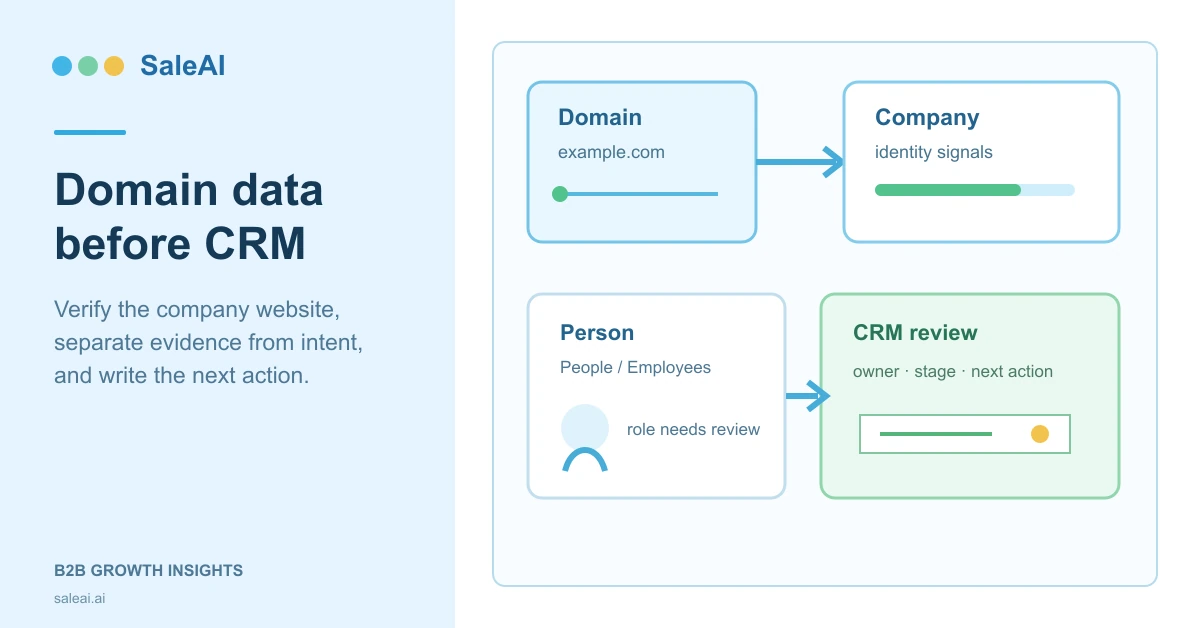
1. Make the small decision first
Before opening a lookup, write the decision the result must support. A domain check is most useful when the next action is specific:
- keep the account in a research queue;
- request a second source before assigning it;
- search for a relevant employee;
- compare a possible importer with customs evidence;
- send a record to a person for CRM review;
- stop because the identity cannot be explained.
This is the difference between a company identity check and a vague search for âmore information.â A team can collect a large amount of domain intelligence and still fail to decide whether the account deserves attention.
| Decision | Minimum evidence to collect | Safe outcome |
|---|---|---|
| Is this the right company? | Website, company name, location or industry cues | Keep, hold, or reject for identity review |
| Is there a person worth researching? | Company match plus a role or employee signal | Start a People or Employees search |
| Is the account commercially relevant? | Domain evidence plus product, market, or trade context | Compare with a second source |
| Can it enter CRM? | Evidence note, owner, stage, and next action | Submit for human CRM review |
The last row matters. A found website is an input to a handoff, not the handoff itself.
2. What the inspected SaleAI route contributes
The four LinkedIn-oriented routes answer different questions. Keeping them separate makes the research trail easier to explain. A SaleAI domain data lookup is the narrowest of the four: it begins with a website and asks what company context can be attached to it.
| SaleAI route | Starting point | Useful question | What it does not establish by itself |
|---|---|---|---|
| People | Person or role criteria | Who may be associated with the target function? | Current authority or buying intent |
| Companies | Company criteria | Which organizations match a broad description? | That the website belongs to the right legal entity |
| Employees | Company or job-role criteria | Which roles appear inside an organization? | That a listed employee still holds the role |
| Domain Data | Company website | What company and professional signals are associated with this domain? | A qualified opportunity or approved contact |
Domain Data is therefore an identity and context step. It is not a universal replacement for Customs Data, Google research, or human review. SaleAI's Enterprise Scope page also describes company, decision-maker, and report-oriented research. Those public descriptions should be treated as product context; the field names in this article come from the inspected backend route.
3. Treat the account as three linked records
The most common domain mistake is collapsing three different things into one row: the organization, its website, and a person. Keep them connected but distinct.
| Record | Example field | Why it needs its own status |
|---|---|---|
| Company | Legal or trading name, country, industry | The organization can change name or ownership |
| Domain | example.com, redirect target, observed date |
A domain can represent several brands or a holding group |
| Person | Name, role, public profile, source date | A role can move even when the company and domain stay stable |
Write the observed domain exactly as returned, then record any preferred or redirected address separately. Do not silently replace a regional site with a global site. A redirect can be harmless, intentional, or a clue that the original record is stale.
For B2B company research, this small separation prevents a familiar failure: one correct company name makes an unrelated contact look trustworthy. The company match and the person match still need their own evidence.
4. Use a domain check as an evidence gate
Open Domain Data when the unresolved question is âWhat organization sits behind this website?â Start with one domain and one reason. For example: âCheck whether this distributor's website supports the company identity already seen in a trade record.â Avoid pasting a list of hundreds of domains before the team knows what a usable result looks like.
The recommended sequence is:
- Copy the domain from the source record without changing spelling.
- Run the domain lookup in
Linkedin Data. - Note the returned company, profile, employee, or related website signals.
- Compare the result with the original record, country, product category, and source date.
- Mark each field as observed, consistent, conflicting, or missing.
- Decide whether another SaleAI route is needed.
The system can speed up collection. The labels and stop rules below are an editorial method for review, not a built-in SaleAI scoring model.
5. Keep observed facts separate from interpretation
A short note can make a lookup reusable. Use a two-column habit while reviewing.
| Observed in the result | Interpretation that still needs a person |
|---|---|
| Domain is associated with a company profile | The company is a suitable buyer for this product |
| Employee or role appears in the organization | This person owns the purchase decision |
| Country or address is shown | The company currently imports from the target market |
| Multiple signals point to one brand | The company is active and ready for outreach |
For a website verification for sales note, include the URL, the date checked, the source route, the matching company string, and the unresolved question. This is a company domain verification task, not a promise that the website represents a ready buyer. A reviewer should be able to see where a conclusion begins rather than reading a confident sentence with no boundary between evidence and judgment.
6. When Domain Data is not enough
Use a second source when the decision has a commercial or reputational cost. SaleAI exposes several routes that can fill different evidence gaps. After SaleAI domain data, the next route should be chosen by the evidence gap, not by the largest available result set.
| Evidence gap | Route to consider | Question for the reviewer |
|---|---|---|
| Historical shipment activity | Customs Data | Does a transaction or counterparty record support the product or market hypothesis? |
| Local visibility or website discovery | Google Data or Google Maps | Does the public listing match the company and location? |
| Employee or role context | People or Employees | Is there a relevant role to research, and is the date clear? |
| Existing relationship | CRM Management | Does an account already have an owner, stage, tag, or contact history? |
| Repeated collection work | Automated Business Data | Can a bounded task collect the same input for review? |
This is not an automatic chain. The inspected backend showed separate modules and task controls. It did not prove that every Domain Data result is automatically sent to CRM, matched to a customs record, or qualified for email. The SaleAI backend workflow explains the broader separation of research, CRM, automation, and email controls. For repeatable collection, the Automated Business Data page is a useful product reference, while the actual task still needs a defined review boundary.
7. Handle conflict with a stop rule
Conflicts are normal. A redirected website, a different country, a holding-company name, or a generic mailbox can each have a reasonable explanation. Do not resolve the conflict by deleting the less convenient signal.
| Conflict | First review | Stop condition |
|---|---|---|
| Company names differ slightly | Trading name, legal name, page footer, and address | No defensible relationship can be written |
| Domain redirects elsewhere | Redirect target and brand relationship | Target site is unrelated or inaccessible |
| Country differs | Local page, contact page, and company profile | No evidence explains the jurisdiction |
| Employee role is old or broad | Role wording and observed date | No reason to treat the person as current |
| Website is parked or empty | Registration and public page signals | No active business identity is visible |
The ICANN Lookup service can be used as an external reference for domain-registration context where available. It is not a substitute for a company check, and registration privacy means the result may be limited.
8. Prepare a reviewable CRM handoff
The handoff should preserve the reason for the record, not just the URL. A SaleAI domain data handoff is easier to audit when it contains a compact note rather than a paragraph of marketing language.
| Handoff field | Example value | Review question |
|---|---|---|
| Account name | Northwind Components | Does it match the reviewed company signal? |
| Domain | northwind.example |
Was the original spelling retained? |
| Source and date | Linkedin Data â Domain Data, 2026-08-14 | Can someone reproduce the lookup context? |
| Evidence summary | Company profile and employee signal align | Which facts are observed, and which are inferred? |
| Confidence note | Hold: country differs from source record | What must be checked next? |
| Owner and stage | Unassigned, research | Has a person accepted responsibility? |
| Next action | Compare with Customs Data | Is the next action small and testable? |
The SaleAI CRM area can organize companies, contacts, owners, stages, tags, and history. The visible controls do not prove that a Domain Data lookup automatically creates a complete CRM record. Treat import, assignment, and stage changes as deliberate handoff steps.
9. Choose a status that reflects evidence, not enthusiasm
Avoid one âqualifiedâ label for every result. A four-state vocabulary is more useful:
- Found: a domain or company was discovered.
- Identity checked: the company and domain relationship is explainable.
- Commercially relevant: a product, market, trade, or role signal supports further review.
- Sales-ready: an owner, next action, and outreach decision are recorded.
The status should move backward when new evidence contradicts the current view. This makes CRM handoff reversible and keeps a domain result from becoming a permanent sales fact simply because it arrived first.
10. Protect the team from attractive but weak signals
Domain intelligence feels precise because a URL is concrete. Precision of spelling is not precision of intent. A polished website may be a manufacturer, reseller, service provider, holding group, or dormant brand. An employee page may describe a past role. A public profile can be useful and still be incomplete.
The NIST Privacy Framework is a useful external reference for thinking about data processing and privacy risk. For security-management vocabulary, the ISO/IEC 27001 overview is another reference point, not a certification claim about a SaleAI result. Neither source tells a SaleAI user whether a specific recipient should be contacted. Keep the source, purpose, reviewer, and retention decision visible in your internal process.
11. Compare workflows before scaling them
Do not compare âmanual researchâ with âAIâ as if they were single products. Compare the work package the team will actually run.
| Workflow | Strength | Weak point | Best first use |
|---|---|---|---|
| Domain-only review | Fast identity triage | Thin commercial context | Cleaning a small prospect queue |
| Domain plus People/Employees | Adds role context | Role freshness still needs review | Finding a plausible stakeholder |
| Domain plus Customs Data | Connects identity to trade evidence | Historical activity is not current intent | Testing an importer hypothesis |
| Domain plus CRM review | Preserves ownership and history | Depends on disciplined handoff | Returning to an existing account |
For domain intelligence, the winning workflow is the one that makes the next decision clearer. A larger result count is not a better outcome if the team cannot explain why the account is in the queue.
12. Measure the pilot with decision quality
During a first pilot, record a few practical measures:
- percentage of domains with an explainable company match;
- percentage requiring a second source;
- percentage stopped for unresolved conflict;
- median review time per domain;
- percentage with an owner and next action after review;
- number of records later corrected by a salesperson.
These measures are internal operating metrics, not SaleAI promises or benchmark results. They expose where the process breaks: source quality, reviewer capacity, identity rules, or CRM discipline. Track whether SaleAI domain data reduces avoidable identity rework, rather than treating the lookup count as a success metric. This also gives an export prospect research team a clear review signal.
13. Run a 7-day domain-to-CRM pilot
Choose one product family and one market. Select 25 domains from an existing research queue. Ask one reviewer to run Domain Data for every row, write the evidence note, and use a second route only when the decision requires it. A second reviewer should inspect at least five accepted and five held records.
| Day | Work | Deliverable |
|---|---|---|
| 1 | Define a good match and stop conditions | One-page review rule |
| 2â3 | Run Domain Data on 25 domains | Evidence notes with dates |
| 4 | Resolve conflicts and choose second sources | Held or accepted decisions |
| 5 | Prepare CRM handoff fields | Owner, stage, tag, next action |
| 6 | Review corrections and time spent | Pilot measurements |
| 7 | Decide whether to expand | Continue, revise, or stop |
Explore SaleAI when you want one workspace for company research, people and domain signals, CRM organization, and repeatable data tasks. Use SaleAI domain data as the first step in a small buyer evidence review, then request a walkthrough that uses your own domain list and review rules rather than a generic demo.
FAQ
What is SaleAI domain data?
It is the Domain Data route inside SaleAI's Linkedin Data area. It starts with a company website and returns company, profile, employee, or related domain signals that can support identity review.
Can a domain result prove that a company is a buyer?
No. It can support a company identity check, but buying intent requires additional product, market, trade, timing, and human-review evidence.
What should I do when a domain redirects to another website?
Record both addresses, inspect the relationship, and mark the result as held until the redirect is explainable. Do not silently overwrite the source domain.
Is Domain Data the same as company qualification?
No. Domain Data is one evidence step. Qualification also requires a defined fit question, relevant evidence, ownership, and a next action.
Which SaleAI module should I use after Domain Data?
Use People or Employees for role research, Companies for broader organization research, Customs Data for transaction context, Google routes for local or public-web signals, and CRM Management for an existing relationship.
Does SaleAI automatically create a CRM record from Domain Data?
That automatic handoff was not verified in the inspected backend. Treat CRM import, assignment, tags, and stages as deliberate review steps.
How should I record a domain review?
Keep the exact URL, source route, observed date, matched company, conflicting fields, reviewer decision, owner, and next action. Separate observed facts from interpretations.
Can Domain Data confirm a current employee role?
No. A role signal may be useful for research, but current responsibility and buying authority still need review.
Should I use domain registration data as proof of a legal company?
No. Registration information can be incomplete or private. Use it as supplementary context alongside company and website evidence.
How large should the first pilot be?
Twenty-five domains is enough to expose common conflicts while keeping every decision reviewable. Increase the sample only after the stop rules and handoff fields work.
