


Sales automation monitoring is the operating discipline of checking whether scheduled sales workflows ran, produced a usable result, stayed within an expected time range, and received human attention when the outcome was uncertain. It is not enough to confirm that an automation is enabled. A workflow can remain active while individual runs fail, inputs become unsuitable, approvals wait too long, or outputs no longer support the intended sales decision.
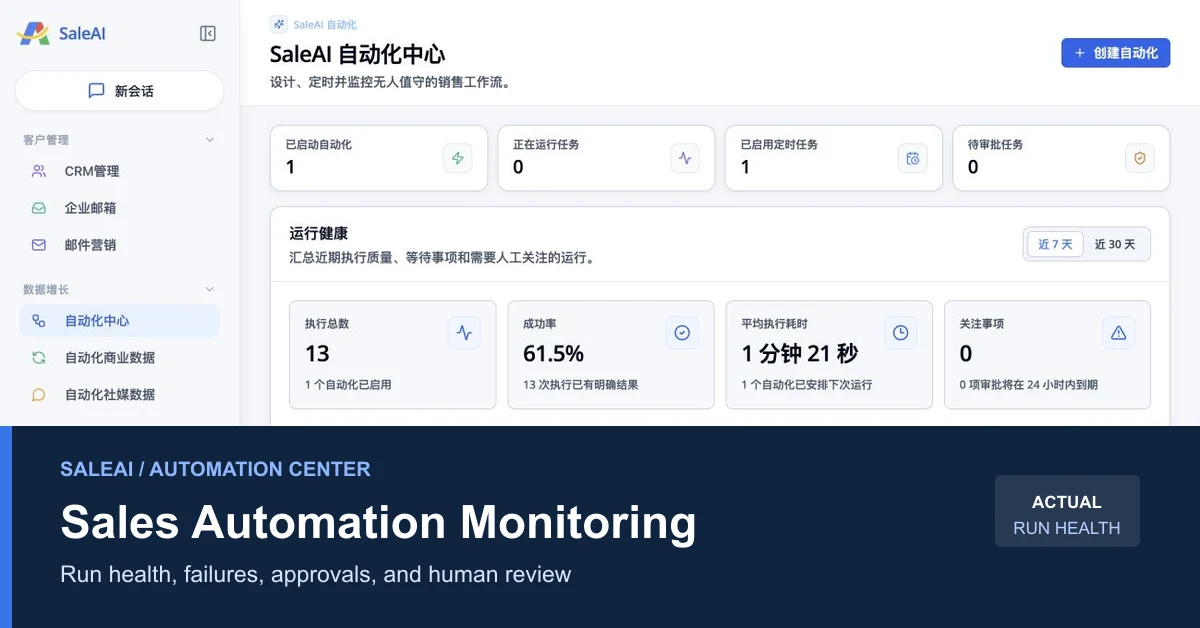
A read-only inspection of the live SaleAI workspace on August 14, 2026, showed the controls needed for a practical monitoring loop: started automations, running tasks, enabled scheduled tasks, pending approval tasks, execution totals, success rate, average runtime, attention items, status distribution, and recent runs that need review. This article turns those visible controls into a repeatable sales-operations process without assuming unverified trigger, retry, or auto-repair behavior.
1. What sales automation monitoring should answer
A useful monitoring process should answer five questions quickly:
- Did the workflow run when expected?
- Did it finish with a clear result?
- Was the result operationally usable, not merely technically complete?
- Does a person need to approve, correct, or stop the next action?
- What evidence should be retained before the workflow runs again?
This approach is designed for teams using automation to support lead research, data collection, CRM preparation, email drafting, or scheduled follow-up. It is not a replacement for infrastructure observability, deliverability monitoring, legal review, or sales judgment.
At an operating level, workflow automation monitoring combines an automation dashboard, automation run health, review of failed automation runs, and an approval queue. The goal is sales workflow reliability, not simply more scheduled sales automation.
The distinction matters. A completed company-search task may still return irrelevant businesses. A generated email draft may still contain an unsupported claim. A technically successful CRM action may still assign the wrong owner. Sales automation monitoring therefore needs both system signals and business-quality checks.
2. What the live SaleAI Automation Center actually shows
The live SaleAI backend workflow presents Automation Center as a Data Growth module for designing, scheduling, and monitoring unattended sales workflows. The August 14 inspection showed the following snapshot:
| Dashboard signal | Observed value | What it proves | What it does not prove |
|---|---|---|---|
| Started automations | 1 | At least one automation was enabled | That every run was healthy |
| Running tasks | 0 | No task was running at inspection time | That no run was delayed earlier |
| Enabled scheduled tasks | 1 | A schedule was active | The exact trigger or retry policy |
| Pending approval tasks | 0 | Nothing was waiting in the visible approval count | That all outputs had been manually reviewed |
| Total executions | 13 | Thirteen runs were included in Run Health | That all runs had equal business value |
| Success rate | 61.5% | Eight of thirteen runs had a clear successful status | Why the other five runs failed |
| Average execution time | 1 minute 21 seconds | The dashboard calculated a mean runtime | The acceptable runtime for every workflow type |
| Attention items | 0 | No visible item was approaching the displayed 24-hour attention condition | That every completed output was accurate |
The execution-status distribution showed eight successful runs and five failed runs, with zero running, queued, waiting for scheduling, waiting for approval, cancelled, or skipped at that moment. A recent-attention panel listed failed executions for a scheduled LED prospect-search and email-draft workflow.
These values are a dated operating snapshot, not plan limits or permanent product benchmarks. They are useful because they demonstrate that SaleAI exposes run-level health signals instead of showing only an on/off status.
3. Read Run Health as a decision table, not a vanity dashboard
The first rule of sales automation monitoring is to connect each metric to an owner and a decision. A percentage without an action threshold creates visibility but not control.
| Signal | Diagnostic question | Recommended owner | Possible decision |
|---|---|---|---|
| Success rate | Is the workflow completing reliably enough for its risk level? | Automation owner | Continue, investigate, or pause |
| Average runtime | Is execution time stable for comparable runs? | Operations owner | Observe, inspect an outlier, or change schedule capacity |
| Failed runs | Are failures isolated, repeated, or clustered after a change? | Workflow operator | Retry only after cause review, revise input, or escalate |
| Pending approvals | Is a human decision blocking time-sensitive work? | Named approver | Approve, reject, request correction, or expire the item |
| Attention items | Which runs are approaching a review deadline? | Queue owner | Reassign or resolve before the internal deadline |
| Status distribution | Is work accumulating in one state? | Sales operations lead | Remove a bottleneck or narrow automation scope |
Google's Site Reliability Engineering guidance says dashboards should answer basic service questions and keep alert signals simple enough to produce action. The Google SRE monitoring chapter is written for distributed systems, but the operating principle also helps sales teams: monitor what requires a decision, not every available number.
4. Run a daily five-minute monitoring loop
A lightweight daily review is more useful than a long monthly audit after errors have accumulated.
- Check the four top-level counts. Confirm whether started, running, scheduled, and pending-approval totals match the operating plan.
- Compare the selected time window. Use the visible 7-day and 30-day views to separate a recent incident from a longer reliability pattern.
- Open the exception queue first. Failed, attention, and approval items should be reviewed before successful runs.
- Record a disposition. Mark the run for continue, investigate, pause, or retire in the team's operating log.
- Assign the next owner and time. A failure without an owner is not being monitored; it is only being observed.
Do not use one universal target for every automation. A draft-generation workflow can tolerate review and correction. A workflow that sends messages, changes CRM ownership, or affects a suppression list should have a lower tolerance for ambiguous outcomes.
5. Investigate failed automation runs with an evidence ladder
When a run fails, start with the strongest available evidence and avoid guessing. A useful evidence ladder is:
- Run status and timestamp: confirm which execution failed and whether nearby runs show the same pattern.
- Input availability: check whether the required market, keyword, source, account, or sender setting was present.
- Source response: determine whether the selected data source returned no result, an incomplete result, or an access error.
- Output validation: check whether a result exists but fails a business rule such as identity, relevance, ownership, or content accuracy.
- Downstream readiness: confirm whether CRM, approval, domain service, recipient selection, or email settings were ready for the next action.
- Change history: identify what changed since the last successful run.
This order keeps sales automation monitoring factual. It also prevents a common error: repeatedly running the same task before identifying whether the failure came from configuration, data, policy, or an external dependency.
The live page did not expose the underlying failure reason in the summary view, so this article does not claim that SaleAI automatically diagnoses root cause or retries every failed run.
6. Separate technical completion from business-quality completion
A green status can mean that the automation executed as designed. It does not necessarily mean the sales result is ready to use.
| Completion layer | Example check | Failure example | Reviewer action |
|---|---|---|---|
| Technical | Did the run finish and return an output? | Timeout, unavailable source, incomplete step | Inspect the run and dependency |
| Data quality | Is the company or contact evidence complete and current enough? | Duplicate company, stale role, missing domain | Revalidate or exclude |
| Commercial relevance | Does the record match the product, market, and buyer definition? | Correct company but wrong customer type | Keep out of CRM activation |
| Governance | Is the next action allowed and assigned? | Missing owner or unresolved approval | Route to a named reviewer |
| Message quality | Is the draft accurate, relevant, and appropriately sourced? | Unsupported claim or mismatched language | Edit or reject before sending |
B2B lead source tracking helps preserve where a result came from. B2B data revalidation helps decide whether older evidence remains suitable for a new action. Both checks strengthen run monitoring because a technically successful output can still be commercially unsafe.
7. Use approval queues for consequential actions
The visible Pending Approval Tasks count confirms that Automation Center has an approval-oriented state. The inspection did not create an automation or approval item, so exact routing rules, permissions, and approval actions remain unverified.
Teams can still define where human review should sit in their own operating policy. Require approval when a workflow is about to:
- Send an external message from a business identity.
- Add a large set of records to SaleAI CRM.
- Reassign account ownership or change a customer stage.
- Use newly collected contact data for marketing.
- Publish a claim that depends on customs, company, or social evidence.
- Continue after repeated failures or an unexplained result change.
The NIST AI Risk Management Framework Core, commonly shortened to NIST AI RMF, recommends monitoring production behavior, documenting performance and limitations, and maintaining post-deployment mechanisms for human input, override, incident response, and recovery. It is a voluntary framework, not a SaleAI product specification, but it provides a credible governance model for human-in-the-loop automation.
8. Set thresholds by risk, not convenience
Thresholds below are examples for an internal operating policy. They are not SaleAI defaults.
| Workflow class | Example | Suggested review trigger | Why |
|---|---|---|---|
| Research only | Automated Business Data collection | Two consecutive failures or a major drop in usable records | Poor output wastes analyst time but does not directly contact a buyer |
| Data preparation | Deduplication, tagging, or CRM-ready list preparation | Any unexplained overwrite, ownership conflict, or high duplicate rate | Incorrect records can spread across later stages |
| Draft creation | Email subject or body draft | Every new template, language, product claim, or market | A draft is useful only after factual and audience review |
| External activation | SaleAI Email Marketing task | Approval before launch plus immediate pause on identity, suppression, or recipient concerns | The action reaches people outside the company |
For a new workflow, begin with stricter review and relax only after repeated, documented evidence of acceptable behavior. The 61.5% success rate observed in the live snapshot is a reason to inspect failures, not enough information by itself to judge whether the automation should be disabled.
9. Monitor scheduled lead research and email drafting as separate outputs
The recent-attention panel showed failures for a workflow named around daily LED prospect search and email drafting. That name contains at least two business outputs: a prospect set and a draft message. They should not share one quality decision.
Review the prospect output for company identity, market fit, source, duplication, and contactability. Review the draft output for product accuracy, personalization basis, sender identity, reply path, language, tone, and claims. A failed search should not be hidden by a successfully generated generic draft, and a good prospect list should not justify an inaccurate message.
The same separation applies to Automated Social Media Data. A public profile, search result, or map listing may support research, but it does not automatically establish permission, buying intent, or decision authority.
10. Connect monitoring to CRM and email outcomes
Sales automation monitoring becomes more valuable when run health is connected to the outcome of the work.
For workflows that prepare or change records in CRM Management, track:
- Number of candidate records produced.
- Number accepted after identity and relevance review.
- Duplicate or conflicting records.
- Records assigned to an owner.
- Records with a dated next action.
For email-related workflows, the inspected SaleAI Email Marketing interface exposes arrival rate, open rate, total emails, delivered emails, opened emails, and time-based trends. Those are useful activation signals, but an open is not proof of buying intent and delivery is not proof that the recipient was appropriate.
The US Federal Trade Commission CAN-SPAM compliance guide states that commercial email rules include accurate header information, non-deceptive subjects, an opt-out method, and responsibility for third parties acting on a company's behalf. Teams should also review the laws and platform rules that apply to each recipient market and subscriber type.
11. Use a 30-day implementation plan
| Period | Operating task | Deliverable |
|---|---|---|
| Days 1-3 | Inventory enabled and scheduled automations | Owner, purpose, source, output, schedule, downstream action |
| Days 4-7 | Define success beyond technical completion | Acceptance checklist for data, CRM, approval, and messaging |
| Week 2 | Set review triggers and escalation times | Threshold table and named backup owner |
| Week 3 | Review failed and successful samples | Cause categories, false-success examples, corrective actions |
| Week 4 | Compare 7-day and 30-day patterns | Continue, revise, pause, or retire decision for each workflow |
Keep the monitoring log small enough to use. Record the workflow, run time, status, impact, evidence, decision, owner, and next review date. Do not create dozens of fields that operators will skip.
At the end of the first month, review whether the automation still supports the intended sales process. NIST's 2026 report on challenges in monitoring deployed AI systems separates functionality, operational behavior, and other monitoring categories. That distinction supports the same practical lesson: one metric cannot represent every kind of reliability.
12. What the current backend proves and what remains unverified
The live backend proves that SaleAI Automation Center exposes high-level execution and approval signals, multiple status states, 7-day and 30-day health views, recent items needing attention, and a Create Automation entry point.
The read-only inspection did not create or edit an automation. It therefore does not prove:
- Which trigger and action types are currently available.
- Whether every failed run can be retried from the interface.
- How approval roles and permissions are configured.
- Whether alerts can be sent through email, chat, or another channel.
- How long detailed run logs are retained.
- Whether the platform automatically identifies root cause or repairs a workflow.
These limitations make the article more useful, not less. Buyers can distinguish visible monitoring controls from implementation details that should be confirmed during a product walkthrough or controlled pilot.
13. Take the next step with a controlled monitoring pilot
Start with one scheduled workflow that has a clear owner and a reversible output. Define expected inputs, a business-quality acceptance checklist, a review deadline, and conditions for pause. Run it long enough to compare successful and failed cases, then decide whether to expand the scope.
This is the safest way to evaluate sales automation monitoring in SaleAI: observe the run, inspect the output, retain the evidence, and keep consequential actions under human control. Teams can explore SaleAI pricing and request a product walkthrough focused on Automation Center, approval handling, Run Health, and the exact workflow types they plan to operate.
FAQ
What is sales automation monitoring?
It is the process of checking whether automated sales workflows ran as expected, produced a usable output, met business-quality rules, and received human attention when required.
Is an enabled automation the same as a healthy automation?
No. Enabled status shows that a workflow is active. Health also depends on run completion, failures, runtime patterns, output quality, approvals, and downstream readiness.
What does SaleAI Run Health show?
The inspected page showed execution total, success rate, average runtime, attention items, status distribution, recent runs requiring attention, and 7-day or 30-day views.
Does SaleAI automatically fix failed automation runs?
Automatic root-cause diagnosis and repair were not verified during the read-only inspection. Teams should inspect failure evidence before rerunning or changing a workflow.
What success rate should a sales automation have?
There is no universal target. The acceptable rate depends on workflow risk, output reversibility, data-source variability, and whether a human reviews the result before external action.
When should an automation require approval?
Use approval for consequential actions such as external messaging, large CRM changes, ownership reassignment, use of newly collected contact data, or continuation after unexplained failures.
How often should Automation Center be reviewed?
A daily exception review and a weekly trend review are practical starting points. Higher-risk or time-sensitive workflows may need more frequent attention.
Should a successful run always move records into CRM?
No. Records should first pass identity, relevance, duplicate, ownership, and source checks appropriate to the intended CRM action.
Which email metrics can support monitoring in SaleAI?
The inspected Email Marketing interface showed arrival rate, open rate, total emails, delivered emails, opened emails, and trend views. These metrics do not replace recipient-relevance or compliance review.
What is the first workflow to monitor in a pilot?
Choose one scheduled, repeatable workflow with a named owner, reversible output, and clear acceptance criteria. Research or draft creation is usually easier to control than immediate external activation.
