


A buyer asks for a quote.
The salesperson opens an old Excel file.
Copies last month’s format.
Changes the product name.
Checks the MOQ.
Looks for the latest freight note.
Adds payment terms.
Exports a PDF.
Then writes another email to send it.
None of this feels difficult.
But when three buyers ask for quotes in the same afternoon, small mistakes start to appear. A price is copied from the wrong version. A payment term is left unchanged. A delivery time from an old quote stays in the document. The PDF looks slightly different from what another colleague sent yesterday.
That is the real reason exporters look for an AI quotation generator.
Not because quoting is impossible.
Because repeated quoting creates hidden errors, delays, and inconsistent buyer experience.
What an AI Quotation Generator Actually Does
An AI quotation generator helps sales teams turn structured product and deal information into a clear quotation document.
In export sales, that usually means taking fields like:
- Product name
- Model number
- Quantity
- Unit price
- MOQ
- Packaging
- Lead time
- Payment terms
- Validity period
- Shipping terms
- Contact information
- Notes or special conditions
Then the system formats those details into a quotation that is ready to review, download, or send.
The useful part is not only the document design. The useful part is reducing repeated manual formatting.
A good quotation generator should help the team answer:
| Question | Why It Matters |
|---|---|
| Is all required information included? | Missing terms can slow down buyer decisions |
| Is the format consistent? | Buyers compare suppliers quickly |
| Is the quote easy to read? | Confusing quotes create extra back-and-forth |
| Can the quote be exported or shared? | Sales teams often need PDF, link, image, or email formats |
| Can fields be changed safely? | Different buyers need different terms |
| Can the quote connect to follow-up? | Quoting is part of the sales workflow, not a separate document task |
This is where automation starts to help.
When Export Quotation Work Becomes a Problem
Most teams do not notice quotation problems when volume is low.
If one salesperson sends five quotes a week, Excel or Word may be enough.
The problem starts when the team grows, product lines expand, or buyers ask for different versions.
For example:
- One buyer wants FOB pricing.
- Another asks for CIF terms.
- A distributor needs a branded quote.
- A repeat buyer just wants numbers quickly.
- A WhatsApp buyer needs a lightweight mobile version.
- A new buyer expects a professional PDF with company branding.
- A manager wants to check quote history later.
If every quote is built manually, the sales team depends on memory and copy-paste discipline.
That works until it does not.
When an AI Quotation Generator Helps Most
An AI quotation generator helps most when the quotation process is repetitive, field-based, and time-sensitive.
Here are the best-fit situations.
| Situation | How Quotation Automation Helps |
|---|---|
| Many RFQs arrive close together | Sales reps can prepare quotes faster without rebuilding format each time |
| Product details are structured | Fields like MOQ, price, model, and lead time can be reused safely |
| Different buyers need different layouts | The team can choose simple, branded, or mobile-friendly quote formats |
| Quotes are often sent by email or WhatsApp | PDF, image, or link formats make sharing easier |
| Sales managers need consistency | Templates reduce format differences between team members |
| Follow-up depends on quote status | CRM or email follow-up can connect to the quotation workflow |
This does not mean the system should send every quote without review.
For export sales, human checking still matters. Prices, trade terms, freight, custom requirements, and buyer-specific conditions can affect the deal.
The best use of AI is to prepare the quote quickly, then let the sales team review the commercial details before sending.
When It Does Not Help Much
An AI quotation generator is not equally useful for every business.
It may not help much if:
- You send only a few quotes per month.
- Every quote is fully custom and requires engineering review.
- Pricing changes hourly and cannot be stored safely.
- Your team has no clear product data.
- Payment and delivery terms change case by case.
- Managers still need to approve every line manually outside the system.
In these situations, quotation automation can still support formatting, but it will not solve the deeper workflow problem.
The system needs clean inputs.
If product names, models, prices, and terms are already messy, an automated quote may only make the mess look nicer.
What a Good Export Quote Should Include
A quote is not only a price sheet.
For buyers, it answers whether the supplier is clear, organized, and easy to work with.
A practical export quotation should include:
| Section | What to Include |
|---|---|
| Supplier information | Company name, logo, contact person, email, phone, address |
| Buyer information | Buyer company, contact name, country, inquiry reference |
| Product details | Product name, model, specification, image if needed |
| Quantity and MOQ | Requested quantity, MOQ, carton quantity, or order condition |
| Price | Unit price, currency, total amount, price basis |
| Trade terms | FOB, CIF, EXW, DDP, or other terms if applicable |
| Lead time | Production time, delivery estimate, or sample time |
| Payment terms | Deposit, balance, payment method, due condition |
| Validity | Quote valid for 7, 15, or 30 days |
| Notes | Packaging, customization, certification, warranty, or special remarks |
| Next step | Sample, confirmation, payment, meeting, or follow-up action |
This is the kind of structure that helps buyers respond faster.
A quote that only says “price attached” often creates more questions.
The Difference Between a Quote Template and a Quotation Workflow
Many exporters already have quotation templates.
A template is helpful, but it does not always solve the workflow.
A template gives you a format.
A workflow helps the team move from request to quote to follow-up.
Here is the difference:
| Item | Static Quote Template | AI Quotation Workflow |
|---|---|---|
| Data entry | Manual copy-paste | Field-based input |
| Format | Fixed document | Multiple layouts |
| Error control | Depends on the salesperson | Required fields reduce missing details |
| Preview | Manual check | Real-time preview before export |
| Sharing | Usually PDF or file attachment | PDF, image, link, or email |
| Follow-up | Separate email or spreadsheet | Can connect to email or CRM |
| Team consistency | Harder to control | Easier to standardize |
For a small team, a template may be enough.
For a team handling frequent RFQs, different markets, and multiple products, a workflow becomes more useful.
How SaleAI Handles Quotation Generation
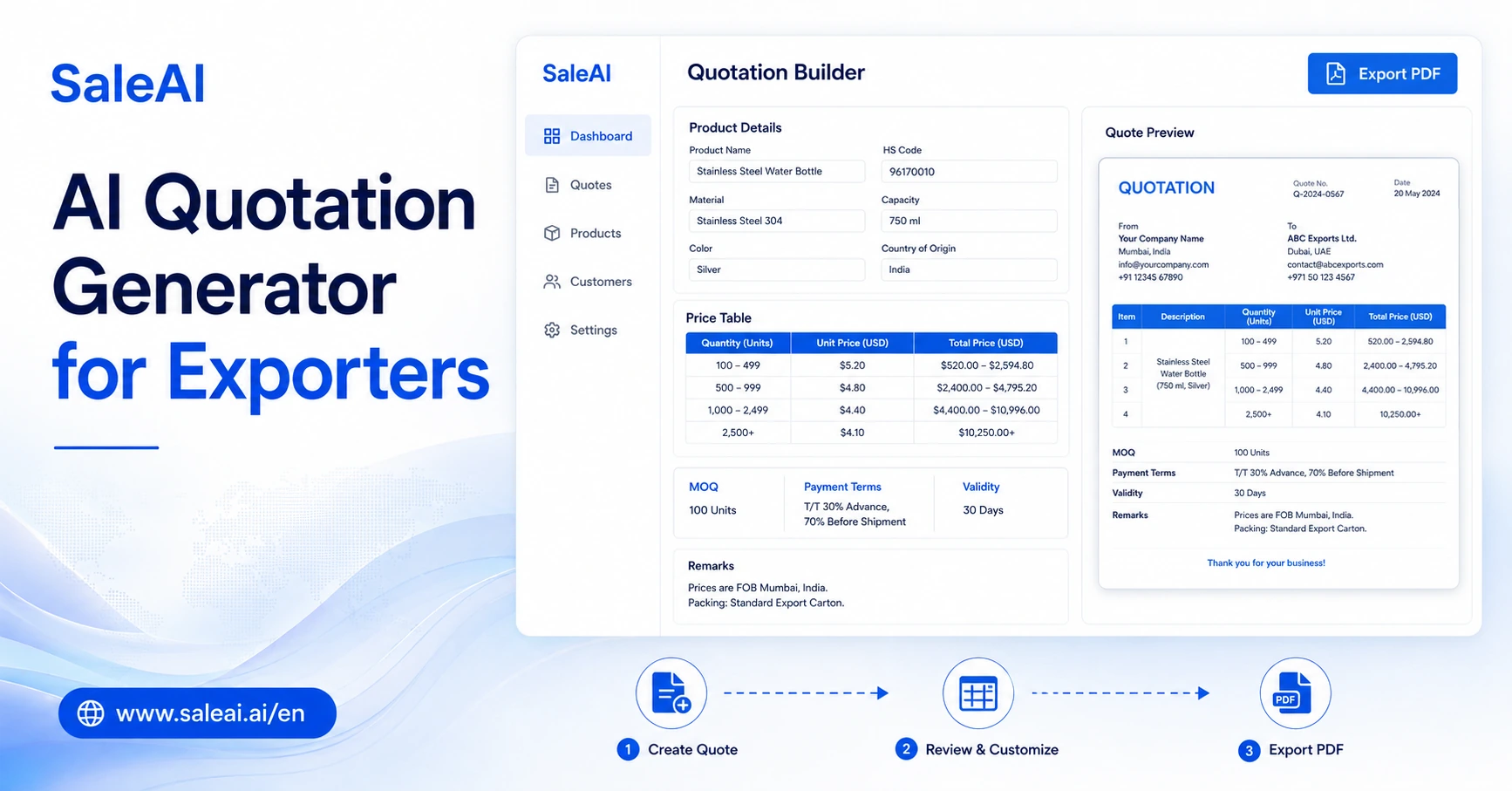
SaleAI’s Quote Generator Agent is designed for export teams that want to prepare quotes without rebuilding documents from scratch.
The workflow is simple:
- Choose a quotation layout.
- Fill in product, price, MOQ, delivery, and payment fields.
- Preview the quote.
- Adjust fields if needed.
- Export as PDF, image, or link.
- Send directly or connect it with the next sales action.
This matters because different buyers do not always need the same quote style.
A repeat buyer may only need a clean number-focused quote.
A new buyer may need a branded quotation to build trust.
A mobile-first buyer may prefer a lightweight version that opens easily from WhatsApp.
SaleAI supports this idea by treating quotation as part of the export sales flow, not just a document task.
Example: Before and After Using a Quotation Generator
Here is a common situation.
A packaging machinery supplier receives an RFQ from a buyer in Mexico.
The buyer asks for:
- Machine model
- Unit price
- MOQ
- Lead time
- Payment terms
- Warranty
- Shipping estimate
- Optional spare parts
Without a quotation generator, the salesperson may need to find old documents, update the format, check with the product team, and manually prepare a PDF.
With a structured quotation tool, the salesperson can enter the key fields and generate a consistent quote for review.
The quote still needs human judgment. The sales rep should check whether the price is current, whether the lead time is realistic, and whether the buyer needs extra notes.
But the formatting work is reduced.
That is the practical value.
What Export Teams Should Not Automate Blindly
Quotation automation should not remove responsibility from the sales team.
Some parts should always be reviewed:
| Field | Why Human Review Matters |
|---|---|
| Unit price | Pricing may depend on quantity, market, or buyer type |
| Freight estimate | Shipping costs can change and may need confirmation |
| Trade terms | EXW, FOB, CIF, and DDP create different responsibilities |
| Certification claims | Buyers may require accurate compliance details |
| Customization | OEM/ODM requests may affect cost and lead time |
| Validity date | A quote should not stay open longer than the price allows |
| Special notes | Miswritten conditions can create disputes later |
This is why “one-click sending” should not mean “no review.”
The best process is faster preparation plus smarter checking.
How to Choose an AI Quotation Generator
Before choosing a quotation tool, exporters should look at the real quoting process in their team.
Ask these questions:
| Question | Good Sign |
|---|---|
| Can the tool support your common quotation fields? | Product, model, MOQ, price, lead time, payment, validity |
| Can you choose different layouts? | Simple, branded, and mobile-friendly versions |
| Can you preview before sending? | Sales reps can catch mistakes early |
| Can quotes be exported in useful formats? | PDF, image, link, or email |
| Can the team control which fields appear? | Different buyers can receive different levels of detail |
| Can it connect to follow-up or CRM? | The quote does not disappear after sending |
| Is it easy enough for salespeople? | No design or technical skill required |
Do not choose based only on how polished the design looks.
A good quote should look professional, but it also needs to fit the sales workflow.
How This Connects With Email and Follow-Up
A quotation is rarely the end of the conversation.
After sending a quote, buyers may:
- Ask for a discount
- Request technical details
- Compare with another supplier
- Ask for sample terms
- Stop replying
- Forward the quote internally
- Ask for a revised version
This is why export teams should connect quotation generation with email follow-up.
For example:
- Buyer requests a quote.
- Salesperson generates the quote.
- Quote is sent by email or WhatsApp.
- CRM records the quote status.
- Follow-up is scheduled.
- Email Writer Agent helps draft the next message based on buyer response.
This makes the quotation part of a real sales process.
If the quote is only saved as a file on someone’s desktop, follow-up becomes easier to miss.
Common Mistakes Exporters Make With Quotations
Mistake 1: Sending prices without context
A buyer may need more than price. MOQ, lead time, payment terms, and validity can affect the decision.
Mistake 2: Using old quote files
Old files create hidden risks. One unchanged line can cause confusion later.
Mistake 3: Making every quote too heavy
Not every buyer needs a full branded proposal. Sometimes a clean, simple quote works better.
Mistake 4: Ignoring mobile viewing
Many buyers open quotes on phones, especially when the conversation starts on WhatsApp. A quote that is hard to read on mobile can slow the conversation.
Mistake 5: Forgetting follow-up
The quote may be clear, but if no one follows up, the opportunity can go cold.
FAQ
What is an AI quotation generator?
An AI quotation generator is a tool that helps sales teams create quotation documents from structured fields such as product name, model, price, MOQ, payment terms, and delivery time. For exporters, it can reduce repeated formatting work and help quotes look more consistent.
Is an AI quotation generator useful for exporters?
Yes, an AI quotation generator is useful for exporters when the team sends frequent quotes, handles many RFQs, or needs consistent PDF, image, link, or email-ready quotation formats. It is most useful when product and pricing information can be entered in structured fields.
Can AI replace manual quotation review?
No. AI can help prepare and format the quote, but salespeople should still review pricing, freight, trade terms, delivery time, custom requirements, and validity before sending.
What should an export quotation include?
An export quotation should include supplier details, buyer details, product information, quantity, unit price, total price, MOQ, trade terms, payment terms, lead time, validity, notes, and the next step.
Should every buyer receive the same quote format?
No. Repeat buyers may prefer a simple format. New buyers may need a branded quote. WhatsApp buyers may need a lightweight mobile-friendly version. The quote format should match the buyer situation.
How does quotation automation help after an RFQ?
Quotation automation helps sales teams respond faster after an RFQ by turning product and pricing details into a clear quote. It can also support follow-up when connected to email or CRM.
Final Takeaway
An AI quotation generator is not valuable because it makes quoting feel “high-tech.”
It is valuable when it removes repeated formatting work, reduces missing details, and helps the buyer understand the offer faster.
For export teams, the best quotation process is not fully automatic and not fully manual.
It sits in the middle:
Structured fields.
Clear templates.
Fast preview.
Human review.
Easy export.
Tracked follow-up.
That is where SaleAI Quote Generator Agent fits best. It helps export teams move from buyer request to professional quote without rebuilding the same document again and again.
