


An importer shortlist can go wrong before anyone contacts a company. A forwarding business may appear beside a familiar product description and a believable port. Label that row “importer” too soon, and the next person inherits the assumption.
A customs data filter audit checks how a search was built and what each result actually supports. Record the mode, source, dates, route, product boundary, party names and exclusions. Then decide what still needs a human check.
Treat the customs data filter audit as a replayable note, not a shortcut to decide who gets contacted.
The notes below are illustrative, not customer testimony. SaleAI’s Customs Data supports the check; a shipment is not a forecast.
Customs Data Filter Audit: Review a Shipment Record Responsibly

The product details come from the signed-in SaleAI workspace reviewed for this guide. Customs Data showed four views: Transaction Information, Find Buyers, Find Suppliers and Trade Trend Analysis. Searches could be bounded by date, source, buyer or seller, HS code, origin and destination, with quantity, amount, weight, TEU and NVL/logistics-company controls visible. Availability in that workspace does not establish coverage for every account or market.
Begin with the row's intended use
“Find importers in Europe” sounds clear until two people run it. One searches a phrase across five years; the other picks one HS code, one destination, and the last six months. The lists can still disagree.
So I write the action before I write the query. "Check whether this company is a buyer" is one version. "See whether Vietnam to Hamburg repeats" is another. On some days the honest version is, "Work out whether these names are freight companies before anyone calls.”
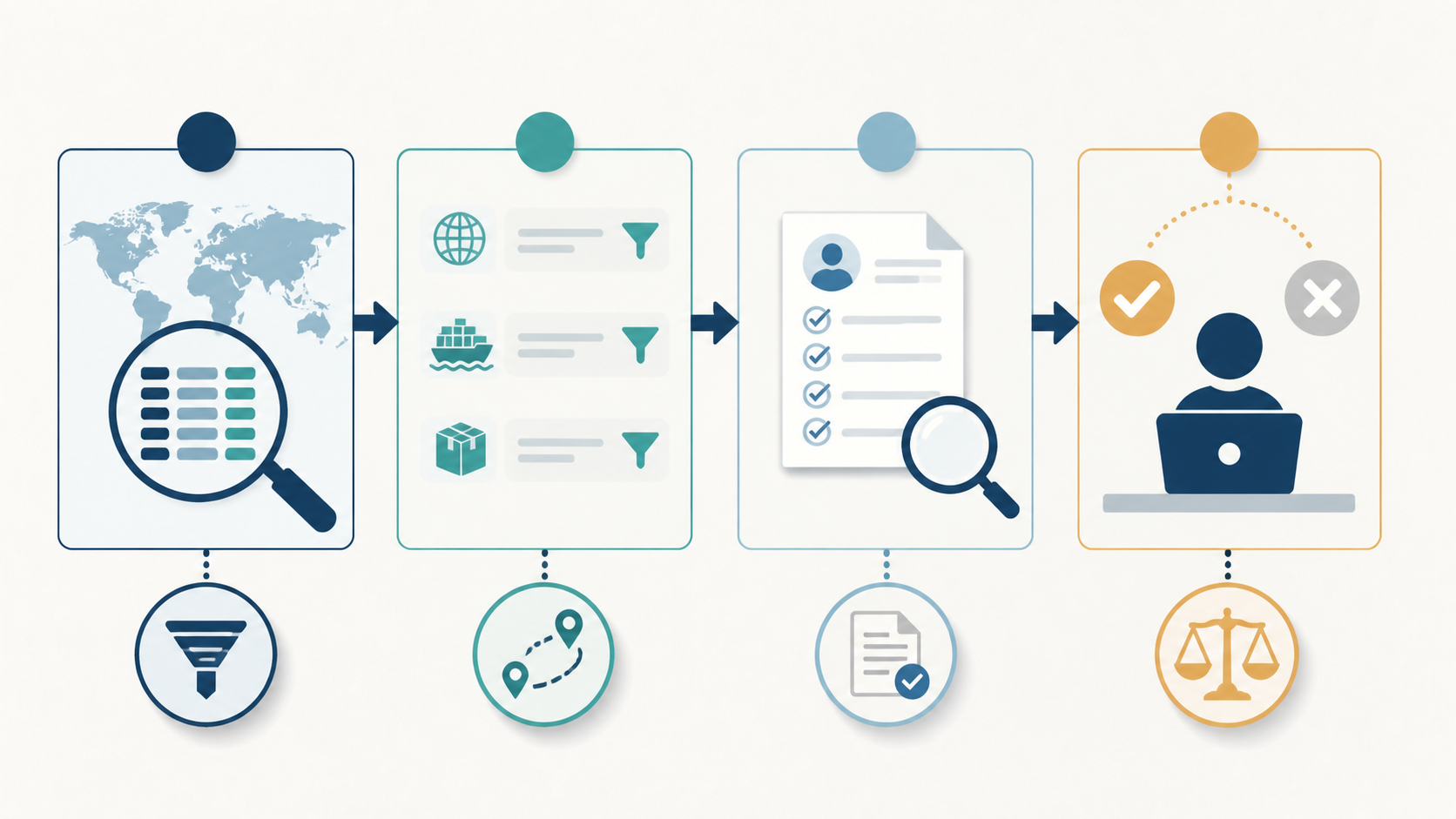
For a customs data filter audit, I put the question at the top of the note, followed by the view chosen to answer it. A disputed company name needs a record to inspect; a change across months needs a trend view. The four routes in the reviewed account were:
-
one questionable shipment or party -> Transaction Information -> keep the row and source date;
-
an importer-side shortlist -> Find Buyers -> treat each name as a candidate;
-
an origin-side relationship -> Find Suppliers -> separate a supplier from a carrier or agent; and
-
activity changing across countries or months -> Trade Trend Analysis -> write the period and aggregation.
Label a query with no next action “exploratory.” Keep it out of the sales handoff until its question is clear.
Keep a change log beside the filters
Change one control per test. Note which rows disappeared and what the change was intended to test.
Dates first, because “recent” is not a date
For an outreach review I may use a short period. For a distributor study I want a window because one shipment can be a one‑off. I record the start and end dates. The day I found a record is not the day the trade happened. It also says nothing about whether the company's still buying.
Then pin down the route
Suppose the brief is shipments from Vietnam to Germany. I record those two countries separately, under origin and destination. A destination of Germany does not specify Hamburg, and I would not describe it that way. If a port appears in a returned record, it belongs in the evidence note; whether it can also be searched depends on the controls and source available.
Compare the product phrase with the HS code
A description such as “plastic fittings” is not enough for a quotation. I would keep that wording and the HS-code candidate in separate cells, then compare the searches below. The code is a classification reference, not a substitute for dimensions, material or intended use. The WCO overview linked below explains the HS framework; an actual classification decision needs the applicable national guidance.
My quick comparison is not clever:
-
product wording;
-
the HS-code candidate;
-
both together;
-
the same search with a narrower route or destination.
I watch the names that vanish. An expected company disappearing from the combined search deserves a note of its own: was the phrase absent, was the code different, or did another filter remove the row? Until that is checked, I would leave the company outside the accepted group, even if a salesperson expected to see it.
Keep the party name untouched for a moment
I copy the returned buyer, importer, seller or supplier name before doing any cleanup. Take the illustrative names “Acme Ltd.” and “Acme Logistics.” I would put them on separate review lines, with the source spelling intact. A shared word is a reason to investigate a connection, not a reason to merge the entries.
Numbers need their labels
I find that quantity, amount, weight, and TEU help when the unit and source definition are clear. A large number can still cover a wide product family, so I put the unit next to any threshold. If I cannot explain the unit, the number remains context. It does not become a score.
Exclude logistics names after the first read
I would inspect a sample with the NVL or logistics-company exclusion off, then repeat the search with it on. Keep the removed names beside the reason for the change. That makes an importer shortlist easier to explain. For a lane study, though, those same forwarding and carrier names may be part of the question, so the exclusion could remove useful context.
A shipment row is evidence, not a buying signal
In these review notes, a returned name starts as a research candidate. The dated record may connect a party with a description, route or quantity. Nothing in that observation tells me what the company would say if contacted today. I need a separate check for current demand, buying authority and permission to make contact.
For the illustrative Acme Ltd. row, I would write “the selected source lists Acme with this product description.” If there are three matching records, the note can say “three records in the selected period,” with the dates attached. Any amount or TEU value stays beside its unit and source definition.
Here is the small boundary check I use before a row moves forward:
| Visible in the record | Safe wording for a review note | Claim I leave out |
|---|---|---|
| Party name and product description | The selected source lists this party with the description shown. | They need our product now. |
| Several records in the chosen period | The relationship appears more than once in this period. | They will place a recurring order. |
| Origin and destination | The selected route appears in the source. | They control this market. |
| Quantity, amount, weight, or TEU | The record provides a scale signal; the unit is noted. | This is the account’s budget. |
| Supplier or exporter name | A supplier relationship is visible in the record. | The supplier is approved or exclusive. |
The right-hand column is worth keeping beside the research queue. It catches the moment a useful observation becomes a sales promise. During a customs data filter audit, I would ask the next reviewer to point to the record behind each sentence. A missing reference means the sentence needs checking.
Write a handoff that can survive a busy Monday
A handoff should still work when the researcher is away. My example note has five parts: the question, exact mode and filters, retained-row references, the unresolved check, and the next owner. “Looks relevant” is not enough. “Identity unresolved; compare the domain before import” gives the next person a job.

| Status in my note | What it means in practice | What happens next |
|---|---|---|
| Observed | The row matches the filters I recorded | Preserve the source and date |
| Identity check | The name needs a website, company, or domain comparison | Check Companies or Domain Data |
| Product-fit check | The party may be relevant, but the item or channel is unclear | Compare wording, code context, and our offer |
| Held | A conflict or logistics relationship is unresolved | Record the conflict; do not merge it |
| Ready for CRM review | Evidence, owner, and next question are visible | Send the note with the row |
The status is allowed to move backward. Suppose a website check identifies the apparent buyer as a forwarding office. My next entry would be Held — party role unresolved, not a replacement company name. That preserves what the source actually returned. A customs data filter audit should leave room for this pause instead of forcing every row into the accepted queue.
Use another SaleAI view only to close a named gap
Before opening another SaleAI view, I would write the missing fact in plain language. “Are these two company names the same business?” is an identity question. “Which role might handle this product?” is a people-research question. The answer determines the next view; opening every data source is not a requirement for reviewing one shipment.
For the follow-up, I put the gap and the SaleAI route on the same line:
-
identity -> Linkedin Data Companies or Domain Data, for name and website context;
-
a role hypothesis -> Linkedin Data People or Employees;
-
public local context -> Google Data or Google Maps;
-
existing ownership -> CRM Management; and
-
a repeatable bounded search -> Automated Business Data.
I would keep the result of each follow-up beside the question it answered. A company-domain comparison might settle identity while leaving product fit unresolved. A person's profile might suggest a role without establishing purchase authority. Even an existing CRM entry needs its own source date checked before the team treats the research as current.
Put CRM after review
Before import, attach the original party name, source date, route and product or HS-code reasoning. Keep unresolved conflicts visible. Add an owner, stage, tag, next action and recheck date to the handoff note. This is a proposed team procedure; it does not imply that SaleAI automatically creates those fields from customs records.
The SaleAI CRM workflow is useful for understanding company and contact context. The CRM import checklist helps when a reviewed group is moved in batches. They do not replace field mapping or ownership rules for your team.
Try it on an awkward sample
For a first trial, I would take one product family, one destination and roughly 20–25 rows. That is a suggested sample, not a validated benchmark. Include an obvious mismatch and an uncertain company identity, not only easy matches. Give another reviewer several rows without the first decisions attached, then compare reasoning and time; the team may need a shorter note or narrower query.
I record the pilot in a second, shorter table:
| Pilot question | What I learn |
|---|---|
| Can another person replay the query? | Whether the audit note is specific enough |
| How many rows need identity or product-fit work? | Whether the first filter is too broad |
| How many rows are held? | Where the rule creates false confidence |
| How long does one review take? | Whether the workflow fits the queue |
| Does each accepted row have an owner and next action? | Whether research can move responsibly into CRM |
The table helps locate the problem. A query that cannot be replayed needs better notes. A queue full of uncertain names may need a different party boundary. If the source cannot answer the question at all, a tighter filter will not rescue it.
Keep the customs data filter audit note and discarded matches with the trial so the next reviewer can see why the rule changed. These are proposed checks, not measured SaleAI performance.
Sources and limits
The World Customs Organization HS overview is a starting point for understanding the classification system. UN Comtrade and the U.S. Census International Trade API offer separate public trade references. The Census Bureau describes its datasets as “detailed, up-to-date trade data” for U.S. trade partners; name geography, period and field definitions before comparing them with SaleAI.
See the SaleAI Customs Data page for product context and About SaleAI for company context. Confirm controls, refresh intervals and coverage in your account; this guide makes no universal volume or freshness promise.
A useful customs data filter audit leaves a trail from the search question to the row and then to the next human check. Keep rejected matches in that trail too. They show the boundary of the query, which matters when another salesperson tries to reuse it.
FAQ
What does the audit note actually cover?
The note should let somebody else run the same query. Keep the selected view, source, dates, party field and product boundary, including any numerical threshold or exclusion. Add the reason a row was retained or held. This documents a search decision; it is not a certification of the company in the result.
Which Customs Data screen fits the job?
When a teammate sends one disputed shipment, I start with Transaction Information. For an importer-side list I use Find Buyers; for the origin side, Find Suppliers. I reserve Trade Trend Analysis for a market or period question. The question chooses the mode. Habit doesn’t.
Why run product wording and an HS code together?
I compare both when the source exposes them. Product wording tells me how the record was described; the HS code gives the search a boundary. If the classification affects a material decision, I check national guidance before calling the match exact.
Does a shipment mean the buyer is active now?
No. Customs records show reported activity for a source and a period. Current demand, authority, budget and timing need a human check. A shipment date is evidence of a shipment. It isn’t the date of a conversation.
When should a logistics name be filtered out?
Those names can swamp an importer shortlist when I’m trying to find the party. I keep the rule in the note because the same carrier or forwarding office may matter in a logistics or route review.
What belongs in the first query?
Write down the question, then choose an initial product boundary, period, route and party field that fit it. Leave the thresholds loose enough to inspect a sample. Any extra control should have a stated purpose, such as removing intermediary noise or testing a narrower product match.
Can amount or TEU decide who gets called?
They can help me compare rows when the unit and source definition are clear. I keep them as context. Not a lead score. Not a sales forecast.
What must be written before CRM?
Record the source and date, identity and product-fit checks, owner, stage and next action. Keep an uncertain company match held rather than importing it as an accepted buyer.
Where do LinkedIn and Maps fit?
Use the second source to answer a named gap. Companies or Domain Data help when the identity is unclear. People or Employees help with a role hypothesis. Google Data or Google Maps add local context. None of those checks proves buying authority on its own.
Could a repeated check be automated?
Automated Business Data may be worth evaluating for a repeatable collection task. I keep the query rule, exception path, review owner and activation decision separate. A person still needs to inspect conflicts before a result becomes outreach.
