


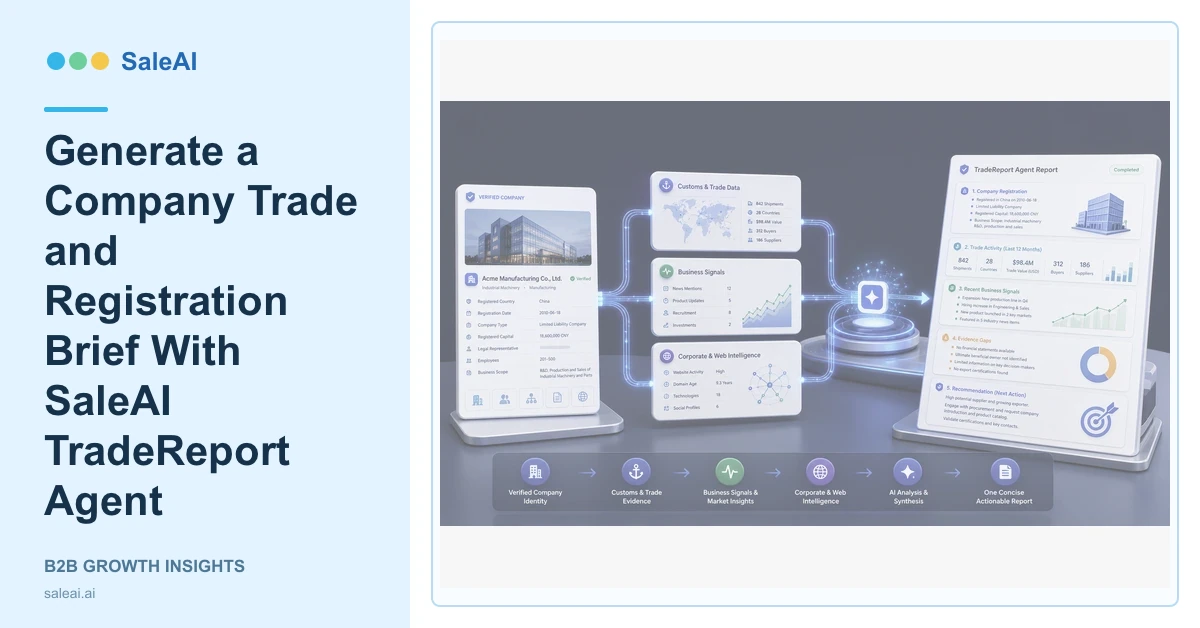
The TradeReport Agent starts with a company name. Its page says one report provides company registration, trade activity, and recent signals, replacing repeated tab-hopping. SaleAI TradeReport Agent is useful when a team needs a concise account brief before deciding whether the company deserves more time.
The report should support a defined decision. Without that decision, the output can become a collection of interesting facts with no owner or next action.
Confirm the company before generating the report
| Input | Better practice | Risk if omitted |
|---|---|---|
| Company name | Use the full verified name | Similar organizations may be mixed |
| Domain | Add the official website | Operating identity remains uncertain |
| Country | Confirm the target entity | Subsidiaries can be confused |
| Report purpose | State qualification or monitoring | Findings lack priority |
| Time period | Define recent and historical windows | Old signals may look current |
Corp Domain Check can help confirm the company and domain before the report begins.
Read registration as identity evidence
Registration information supports legal or corporate identity. It should be compared with the website, address, industry, and known business names. Conflicts should remain visible in the report.
The report should not imply that registration alone proves operating scale, financial health, or product relevance.
If the company belongs to a group, note which legal entity, brand, subsidiary, or country operation the report covers. This avoids sending one entity's trade history or address into another entity's account record.
Read trade activity as a pattern
Customs Data can support deeper transaction analysis when SaleAI TradeReport Agent finds related activity. Review products, parties, periods, repeat transactions, and changes in the supplier or buyer pattern.
Trade evidence can support qualification or monitoring, but it does not confirm the current project, contact person, or willingness to change partners.
Review recent signals
Recent signals may come from company websites, public business activity, professional data, or other supported sources. InsightScan Agent can help compare registration, trade, role, and website evidence. Enterprise Scope can deepen company and stakeholder research.
The report should label the source and date of each important signal. A recent webpage update and a recent transaction are different forms of evidence.
Reviewers should also state which expected signals were not found. Missing evidence is not proof that the company is inactive, but it changes the confidence and the next research step.
Turn the report into an account decision
A useful report ends with one of five outcomes: contact, research further, monitor, hold, or reject. SaleAI CRM should receive approved accounts with ownership and a next action. Data Assets can preserve report evidence and rejection reasons.
The WTO statistics portal and World Bank trade data provide broader context for challenging account-level conclusions.
FAQ
What input does SaleAI TradeReport Agent use?
The official page says users can enter a company name to generate the report.
What does the report contain?
It covers core signals such as registration, trade activity, and recent company evidence.
Does the report replace deeper verification?
No. Important identity, trade, legal, or commercial conclusions may require more focused research.
What should happen after the report?
Assign an outcome: contact, deeper research, monitoring, hold, or rejection.
How should SaleAI TradeReport Agent results enter CRM?
Only reviewed companies with verified identity, a business reason, an owner, and a clear next action should enter active CRM work.
