


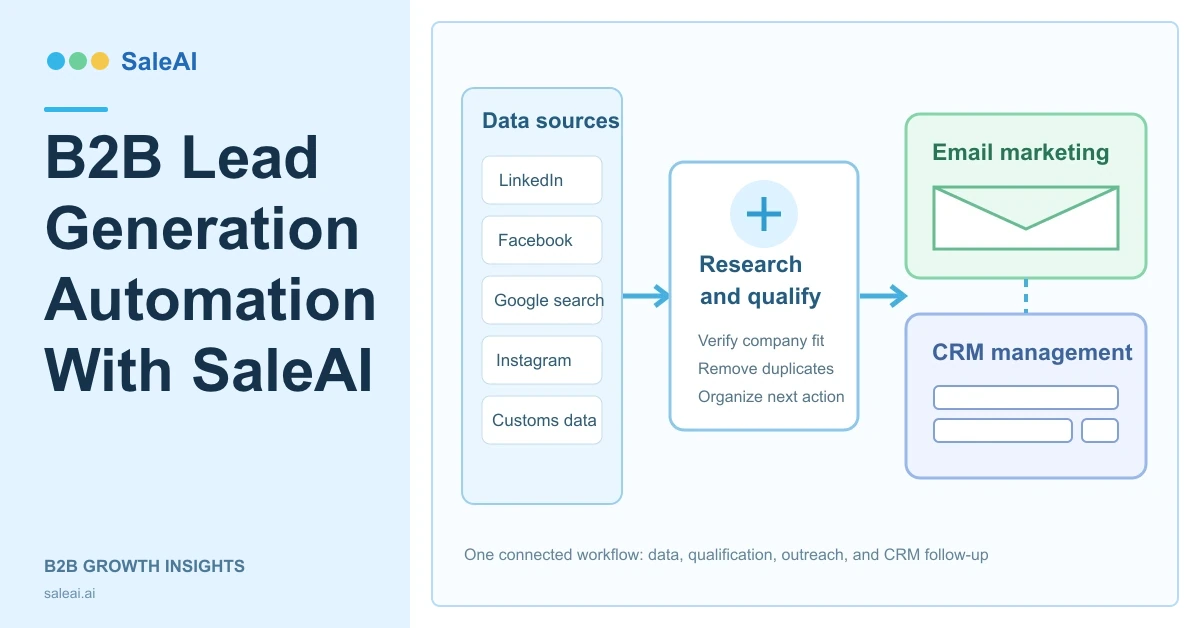
B2B lead generation automation is useful only when it connects research, usable contact data, outreach, and sales ownership. A system that collects thousands of records but does not show where they came from, whether an email is available, or who should follow up simply moves the manual work to another screen.
SaleAI's logged-in backend is organized around a more practical sequence. A team can define its business context, search multiple data channels, keep search results as persistent data assets, move relevant records into CRM, configure email tasks, and review basic delivery and open metrics. Each module has a distinct job, and several controls determine whether the workflow stops at collection or continues into marketing.
This guide explains the functions visible in the current SaleAI backend. It does not assume a Website Builder, a mandatory approval process, or automatic execution between every module.
1. What B2B lead generation automation means in SaleAI
In SaleAI, the workflow starts from one of two places. A user can enter a target customer, product, or growth task in the SaleAI Copilot, or open a dedicated module such as Automated Business Data, Automated Social Data, Customs Data, or LinkedIn Data.
The system then separates four responsibilities:
- Collection: find companies and contacts through business, social, customs, Google, or LinkedIn-oriented searches.
- Persistence: save conversation-generated search results in Data Assets, where they remain available even if the original conversation is deleted.
- Activation: send selected records into CRM or configure an email-marketing task.
- Measurement: review collection status, marketable email and phone counts, CRM processing, delivery, and opens.
That separation matters. B2B lead generation automation is not one button that completes every sales decision. It is a controlled chain in which each module exposes the data and settings needed for the next action.
2. Who this workflow is for, and who should not use it yet
The workflow fits export suppliers, B2B service providers, manufacturers, distributors, and sales teams that repeatedly research target markets and need a common place to manage the resulting companies and contacts.
It is especially relevant when a team uses more than one prospecting source. For example, customs records may reveal import activity, LinkedIn-oriented data may help identify employees, Google Maps may find local businesses, and Instagram or Facebook may surface commercial pages. SaleAI can keep those sources visible instead of flattening every result into an unexplained email list.
The workflow is not ready for a team that has not defined its product, target countries, customer types, or follow-up ownership. Automation can execute a vague instruction at scale, but it cannot repair a vague market strategy. Before starting, the team should know what it sells, who is relevant, which markets matter, and what a useful next step looks like.
3. Start with Customer Settings, not a generic prompt
SaleAI Copilot accepts a target customer, product, or growth task and provides quick entries for LinkedIn, Facebook, Google Search, Instagram, Customs Data, and Email Marketing. The quality of that prompt improves when Customer Settings contains stable business context.
The current Customer Settings panel includes:
- Company name and website.
- Product name and customs HS code.
- Product description or manual summary.
- Preferred countries or regions.
- Target customer types, such as importers, distributors, or wholesalers.
- Preferred channels and products.
- Default email language and tone.
There are separate controls for allowing the agent to read these settings, using them in the current conversation, and automatically saving eligible lead data to CRM. These switches should be intentional. A team may want the Copilot to use product context without automatically depositing every search result into CRM.
For effective B2B lead generation automation, describe the application and buyer role, not only the product name. “LED lights” is broad. “Commercial lighting distributors in Germany that supply warehouse and industrial retrofit projects” gives the search and later messaging a clearer decision boundary.
4. Choose the collection channel by the evidence you need
SaleAI does not treat every source as interchangeable. Each channel answers a different prospecting question.
| Module or channel | Best used for | Main inputs visible in the backend | Output or next step |
|---|---|---|---|
| Automated Business Data | Combining enterprise and trade evidence | Keywords, data tags, enterprise/customs selection, customs filters | Email/phone counts, marketable counts, CRM or email activation |
| Automated Social Data | Finding companies and contacts from social and local-web sources | Instagram, Facebook, Google Data, Google Maps, keywords, match mode, region | Channel-level counts and optional email marketing |
| Customs Data | Investigating actual trade records and counterparties | Product description, dates, HS code, buyer/supplier, origin, destination, quantity, value | Transactions, buyer lists, supplier lists, trend analysis |
| LinkedIn Data | Finding people, companies, employees, or domain intelligence | Name, title, company, keyword, job role, or domain | Deep company/contact detail and CRM deposition |
| SaleAI Copilot | Starting from a business request and selecting a route | Target customer, product, or growth task plus customer settings | Conversation output and saved Data Assets |
Start with the evidence closest to the buying signal. Customs Data is appropriate when shipment history matters. Employee search is appropriate when the company is already known but the buying role is not. Google Maps is useful when geography and local business presence are central. Social data is useful when a company's public profile or audience context matters.
5. Automated Business Data connects enterprise and customs searches
The Automated Business Data module has recent-task and historical-task views, plus one-click and new-task entries. In a new task, users can select Enterprise Data, Customs Data, or both. A common keyword can be synchronized across the selected channels, while each channel can also keep its own keyword and up to five data tags.
The task supports two modes:
- Automated collection: collect the selected data without continuing into outreach.
- Automated marketing: collect data and configure marketing information in the same task.
Customs-specific filters are detailed. They include supplier and buyer names and addresses, date range, source, HS code, origin country, destination, quantity, amount, weight, and TEU. The interface also includes exclusion controls for NVL or logistics supplier and buyer names. These fields help narrow a broad product keyword into a more operational trade-data query.
When automated marketing is selected, the user can define a marketing time window, exclude individual addresses or whole email domains, filter by previous marketing count, choose an email domain service, select a sender identity, set a reply email, choose email content, and specify the send quantity. The current interface states a maximum of 3,000 sends for this task configuration.
Task cards then separate total and marketable email/phone counts and show how many records came from enterprise data versus customs data. This makes the output more useful than a single total. A team can see whether a task generated contactable records and which source contributed them.
6. Automated Social Data combines four different discovery routes
The Automated Social Data module follows a similar task model but uses different sources: Instagram, Facebook, Google Data, and Google Maps.
A shared keyword can be synchronized across channels, while the channel-specific conditions remain visible:
- Instagram accepts search keywords.
- Facebook uses a match mode and keywords.
- Google Data accepts keywords.
- Google Maps uses a match mode, geographic area, and search terms.
The user can choose automated collection or automated marketing and can save the current configuration when the task starts. Task cards report total and marketable email/phone counts, collection status, email-marketing status, and the contribution from each selected source.
This is an important boundary in B2B lead generation automation. Social and local-web discovery can expand market coverage, but the source should remain visible because an Instagram business profile, a Google Maps listing, and a company found through general Google data do not carry the same evidence.
7. Data Assets prevents search results from disappearing with the chat
Data Assets is the persistence layer. The page explicitly states that it manages search data produced by conversations and that the data remains operable after the source conversation is deleted.
Each asset shows:
- Asset title and source.
- Record count.
- Number already processed by CRM.
- Number with an available email.
- Processing status.
- Source conversation.
- Creation time.
Users can search assets by title or keyword and filter by source and status. This structure separates a reusable dataset from the conversation that created it. A salesperson can clean up chat history without losing the underlying research asset, while an operations manager can compare total records with CRM-processed records.
For B2B lead generation automation, that distinction is critical. The conversation explains the request; the asset represents the resulting dataset; CRM represents the records the team has chosen to manage.
8. CRM organizes contacts, companies, and reusable tags
CRM Management has three tabs: Contact Management, Company Management, and Tag Management.
Contact and company views support import, export, data assignment, column settings, preset filters, condition filters, and advanced filters. Contact records can display owner, name, company, email, phone, social media, customer stage, tags, last contact time, and record operations. Company records use a parallel structure with company name and industry.
Tag Management adds a reusable classification layer with tag name, color, creation time, search, creation, editing, and deletion.
This means the CRM is not merely an export destination. It is where B2B lead generation automation becomes accountable. Assignment identifies the owner, customer stage shows current status, tags preserve segmentation, and last contact time supports follow-up decisions.
A practical CRM rule is to deposit records only when the team has a reason to manage them. The Data Asset may contain hundreds of discovered records; CRM should contain the companies and contacts that have entered an owned sales process.
9. Email Marketing has six separate operating areas
The current Email Marketing module is divided into Task Management, New Task, Email Templates, Email Domain Service, Sending Settings, and Email Statistics.
New task configuration
A new task includes a task name, email status, immediate or scheduled sending, email domain service, sender nickname, sender address, reply email, recipients, and email content. Multiple recipient addresses can be entered with comma separation.
Templates and sender identity
Email Templates can be searched by template name and subject. A new template contains a name, subject, and rich-text email body. AI controls are visible for the subject and content editor, and a saved signature can be inserted.
Email Domain Service lists domains with pending or verified status. Sending Settings manages company name, website, reply email, default sender identity, and a detailed signature. Signature fields include name, title, company, logo, website, phone, email, address, and social links. The preview can also be edited as HTML.
Statistics
Email Statistics can separate all sources, Automated Business, and Email Marketing. Users can filter by day, week, month, all time, or a custom range. The visible metrics are email open rate, email arrival rate, total emails, delivered emails, and opened emails, plus a weekly, monthly, or yearly trend view.
These are the metrics confirmed in the backend. Click rate, reply rate, unsubscribe rate, and bounce rate were not visible on the inspected statistics page and should not be presented as current dashboard functions.
10. Use LinkedIn Data when the company or role is already known
The LinkedIn Data module offers four modes: search people, search companies, search employees, and search domain data.
People search accepts a name, job title, company, or LinkedIn keyword. Company search accepts a company name, brand, website, or industry keyword and includes an entry for copying the first 20 company names and batch-mining company emails. Employee search starts from a company and adds an optional job-role filter. Domain search starts from a website and opens company profile, employee, contact, and deeper-detail information.
This module fits the middle of a B2B lead generation automation process. Customs or Google-oriented data may reveal which company matters; LinkedIn-oriented search can then help locate the relevant employee or examine the company in more detail before a record enters CRM.
11. Compare collection-only and collection-plus-marketing workflows
The most important setup decision is whether a task should stop after data collection or continue into email marketing.
| Decision | Collection-only task | Collection plus marketing task |
|---|---|---|
| Primary goal | Build and inspect a dataset | Build a dataset and configure outreach |
| Best for | New markets, uncertain segments, research-heavy projects | Defined segments with prepared sender and content settings |
| Required setup | Sources, keywords, filters, tags | All collection settings plus domain, sender, reply email, content, and quantity |
| Main output | Records, source counts, email/phone availability | Records plus email-marketing status |
| Operational risk | Low relevance or duplicate research | Data-quality, sender, content, timing, and response-capacity risk |
| Recommended next step | Review Data Assets and move selected records to CRM | Monitor collection and email status, then assign responses in CRM |
For a new market, collection-only is usually the clearer first run. It reveals what each source returns before the team commits a sender identity and email content. Collection plus marketing makes more sense when the target definition, exclusions, email configuration, and ownership are already established.
This choice keeps B2B lead generation automation aligned with the team's confidence in the market instead of treating every collected record as immediately ready for outreach.
12. Build controls around the functions the system actually provides
SaleAI exposes useful controls, but the team still owns data quality and outreach decisions.
Use source and status filters in Data Assets. Use customer stage, tags, ownership, and last-contact fields in CRM. Verify the email domain service before relying on it. Use email exclusions to suppress addresses or domain types that should not receive an automated-business campaign. Choose a marketing time window intentionally. Keep the sender identity and reply route accurate.
For technical sending requirements, review the current Google email sender guidelines for the mailboxes you target. For privacy-risk governance, the NIST Privacy Framework provides a general structure for managing data-processing risk. These external references do not replace market-specific legal review.
The system did not show a mandatory approval workflow. If a company requires legal, technical, or brand approval, that is an internal operating control, not a SaleAI feature that should be promised in product content.
13. A practical implementation sequence
Use this sequence to launch B2B lead generation automation without confusing research, activation, and ownership:
- Complete Customer Settings with the company, product, HS code, target markets, customer types, and email preferences.
- Decide which evidence matters: trade activity, company profile, employee role, social presence, or local-market presence.
- Start with one or two collection channels and a narrow keyword set.
- Use collection-only mode for an unfamiliar market.
- Review record count, marketable email/phone count, channel contribution, and status.
- Keep the results in Data Assets and compare total records with CRM-processed records.
- Move relevant contacts and companies into CRM with an owner, stage, and tags.
- Configure a verified domain service, sender identity, reply email, signature, and reusable email template.
- Use automated marketing only after exclusions, content, timing, and response ownership are ready.
- Review arrival rate, open rate, delivery totals, task status, and CRM follow-up.
SaleAI's value is not that every module runs invisibly. Its value is that the workflow makes the source, configuration, processing status, outreach setup, and CRM destination visible. That is the foundation of reliable B2B lead generation automation.
FAQ
What is B2B lead generation automation in SaleAI?
It is a workflow that connects multi-source company and contact discovery, persistent Data Assets, CRM organization, email task configuration, and basic sending statistics.
Can SaleAI collect data without sending emails?
Yes. Automated Business Data and Automated Social Data both provide an automated-collection mode that can stop before marketing.
Which sources are available in Automated Business Data?
The inspected task configuration includes Enterprise Data and Customs Data.
Which sources are available in Automated Social Data?
The inspected configuration includes Instagram, Facebook, Google Data, and Google Maps.
What does Data Assets store?
It stores conversation-generated search datasets with their source, record count, CRM-processed count, available-email count, status, source conversation, and creation time.
Does deleting a conversation delete its Data Asset?
The Data Assets page states that the saved search data remains operable after the source conversation is deleted.
What can be searched in LinkedIn Data?
Users can search people, companies, employees, and domain data. Employee search supports a job-role filter, and domain search starts from a company website.
What fields are required for a new email task?
The current form includes task name, email status, sending time, domain service, sender nickname and address, reply email, recipients, and email content.
Which email metrics are visible?
The inspected dashboard shows arrival rate, open rate, email total, delivered count, opened count, and a time-based trend view.
Does SaleAI include a mandatory email approval workflow?
No mandatory approval workflow was visible in the inspected backend. Teams can add their own internal review process, but it should not be described as a built-in SaleAI function.
