


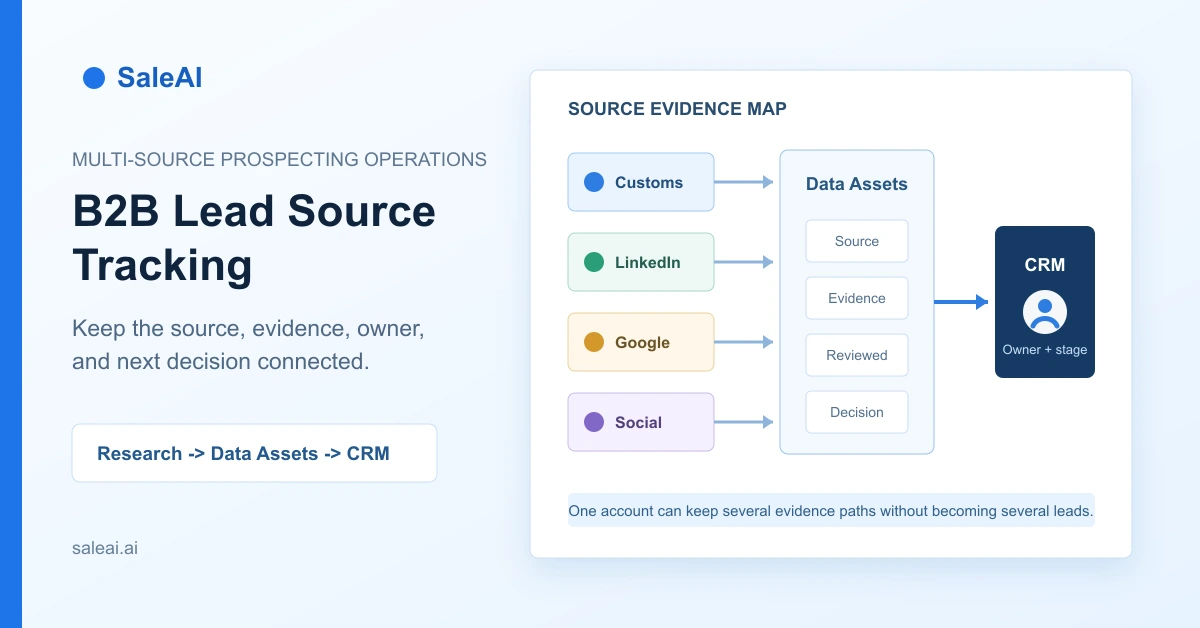
B2B lead source tracking means preserving where a company or contact was found, what that source actually proves, and how the record moved into outreach and CRM. It is not enough to add a label such as "LinkedIn" or "customs." A useful source record also keeps the original search question, the evidence returned, the collection date, the person who reviewed it, and the next decision.
That distinction matters when an export team researches buyers through several channels. A customs record can indicate trade activity. A company website can explain products and market position. LinkedIn-oriented research can help identify employees and possible functions. Google Maps or social pages can show local presence. None of those signals independently confirms that a company is qualified, ready to buy, or safe to contact.
SaleAI separates collection, saved Data Assets, CRM management, and email activity. This creates a practical foundation for tracking provenance without pretending that every source has equal meaning.
1. What B2B lead source tracking should answer
A salesperson should be able to open a record and answer five questions without reconstructing the research from memory:
- Where did this company or contact first appear?
- What search request, keyword, region, or filter produced it?
- What does the source support, and what does it not prove?
- What verification happened before the record entered CRM?
- Which owner, stage, and next action now apply?
Basic lead source attribution often stops at question one. Operational B2B lead source tracking covers all five. It connects acquisition context with a reviewable sales decision.
This is especially important for multi-channel prospecting. If the same company appears in Customs Data, Google Data, and a LinkedIn company search, the result is not necessarily three leads. It is one account with three evidence paths. The team should merge the identity while keeping each path visible.
2. Why a flat prospect list creates false confidence
Spreadsheets commonly flatten company name, website, email, and country into one row. That format is convenient for sending, but it removes the context needed for qualification.
Consider two companies with valid email addresses. The first appeared in a recent customs search for the relevant HS code and destination market. The second appeared in a broad social search because its profile mentioned a related keyword. Both may be worth reviewing, but they do not begin with the same evidence.
When the source disappears, teams tend to make three mistakes:
- Duplicate outreach: the same account is imported from several lists and contacted by different owners.
- Signal inflation: a public profile or employee title is treated as proof of purchase intent.
- Weak learning: campaign results cannot be compared with the research route that produced the audience.
The solution is not to create more tags. It is to define a compact provenance record that survives collection, qualification, CRM handoff, and follow-up.
3. Use a six-field provenance record
The following fields are sufficient for most export prospecting workflows. They are deliberately small enough to maintain.
| Field | What to record | Why it matters |
|---|---|---|
| Source family | Customs, enterprise, Google, Maps, LinkedIn, Facebook, Instagram, referral, or inbound | Preserves the broad discovery route |
| Search context | Keyword, HS code, company, job role, region, date range, or conversation request | Explains why the record appeared |
| Evidence captured | Shipment, website, employee, location, public activity, email, or phone | Separates observed facts from assumptions |
| Collection date | When the result was retrieved or reviewed | Makes stale evidence easier to identify |
| Review status | Unreviewed, verified, duplicate, rejected, or approved for CRM | Prevents raw results from being mistaken for qualified accounts |
| Next decision | Research, assign, contact, monitor, suppress, or reject | Converts data into accountable work |
Do not overload the source field with a conclusion. "Customs Data" describes origin. "Importer with two relevant transactions in the selected period" describes evidence. "Priority account" is a later commercial decision. Keeping those statements separate improves auditability.
4. Match the SaleAI channel to the evidence you need
SaleAI provides several collection routes, and each is useful for a different question.
| SaleAI route | Strongest starting evidence | What still needs verification | Appropriate next step |
|---|---|---|---|
| Automated Business Data | Enterprise and customs-oriented results collected from a defined task | Company identity, product relevance, contactability, duplicates | Save the result, review marketable records, then choose CRM or email activation |
| Automated Social Data | Public business presence across Instagram, Facebook, Google Data, or Google Maps | Legal entity, B2B role, product fit, decision-maker relevance | Verify the website and company role before outreach |
| Customs Data | Transactions, buyers, suppliers, quantities, values, routes, or trends within selected filters | Current demand, purchasing authority, product equivalence, contact permission | Build an account hypothesis and add website or employee research |
| LinkedIn Data | People, companies, employees, or domain-oriented professional context | Current role, authority, relationship to the buying process | Map likely stakeholders and verify through company context |
| SaleAI Copilot | A result generated from a target customer, product, or growth request | Source-specific limitations and record quality | Save useful search output into Data Assets for review |
This channel-to-evidence mapping prevents a common error: choosing a source because it has many records rather than because it answers the current research question.
For example, a team that already knows the target company but not the right function should start with employee or people research. A team evaluating whether a product category is actively traded may start with customs evidence. A team looking for local distributors in a defined city may use Google Maps-oriented collection.
5. Name each collection task like a reusable experiment
"Germany leads" is not a useful task name. It does not identify the product, buyer type, source, or time period. A better name is:
Germany industrial sensor distributors - Google Maps - August review
For customs-oriented research, use a name such as:
HS 9026 German importers - last 12 months - buyer review
Task naming is part of B2B lead source tracking because the task becomes the first unit of comparison. A clear name lets a manager understand what changed between runs without opening every record.
Before starting a task, define:
- The product category or application.
- The target company role.
- The market or region.
- The source and filters.
- The evidence required for approval.
- The owner of the review.
SaleAI Customer Settings can hold stable company, product, target-market, customer-type, language, and tone context. Use those settings to improve consistency, but keep task-specific filters in the task record. Stable business context and temporary research conditions should not be mixed.
6. Use Data Assets as the provenance layer
SaleAI Data Assets stores search data generated through conversations and keeps it operable after the source conversation is deleted. Each asset can show its title, source, record count, CRM-processed count, available-email count, status, source conversation, and creation time.
That makes Data Assets more than a holding area. It is the bridge between a research request and a managed sales record.
A practical operating rule is:
- Keep raw and reviewable search results in Data Assets.
- Move only approved companies and contacts into CRM.
- Preserve the Data Asset title or source in the CRM record or tag structure.
- Record why a rejected or suppressed record was not activated.
The last point matters. Rejection is useful information. If a company was excluded because it was a logistics provider, consumer retailer, duplicate domain, or irrelevant subsidiary, saving that reason prevents the next search from repeating the same work.
7. Score evidence without pretending it is buying intent
A source score should measure research value, not the probability of closing a deal. Use a simple review table rather than a universal lead score.
| Review question | 0 points | 1 point | 2 points |
|---|---|---|---|
| Company identity | Unclear or conflicting | Website or profile found | Legal/company identity and domain agree |
| Product relevance | No visible connection | Adjacent category | Clear product, application, or customer overlap |
| Source evidence | Keyword-only match | One relevant public signal | Multiple consistent or source-specific signals |
| Contact path | No usable path | Generic form or uncertain contact | Relevant business contact or function identified |
| Freshness | Date unknown or clearly stale | Older but still reviewable | Recent enough for the intended decision |
The maximum score is not an automatic permission to send. It means the record has enough evidence for the next human decision. Legal basis, market rules, suppression lists, sender readiness, and message relevance remain separate controls.
This rubric also makes disagreement productive. A salesperson can explain why product relevance scored one rather than two, instead of debating an opaque "AI score."
8. Move reviewed records into CRM with ownership
SaleAI CRM Management separates contacts, companies, and tags. The visible record fields can include owner, company, email, phone, social media, customer stage, tags, and last contact time. Company records use a parallel structure.
When a record enters CRM, preserve three pieces of context:
- The source family and originating Data Asset or task.
- The qualification reason and unresolved question.
- The named owner and dated next action.
This is where B2B lead source tracking becomes operational. A source without an owner is research inventory. An owner without source context may repeat work or send a generic message. Both are needed for accountable follow-up.
Use tags for stable classifications such as market, segment, or source family. Do not create a new tag for every search phrase. Detailed search context belongs in the asset title, notes, or a structured field; otherwise the tag list becomes unusable.
9. Keep outreach results connected to the audience source
SaleAI Email Marketing separates task management, new tasks, templates, domain service, sending settings, and statistics. The current interface shows delivery-oriented counts, arrival rate, open rate, delivered emails, opened emails, and time-based trends.
Before activating a dataset, create one audience definition per task. Avoid combining customs-derived importers, broad Google results, and social profiles in the same email run. If the sources are mixed, later delivery and open data cannot explain which research route created the usable audience.
Source-aware email review should answer:
- Which Data Asset supplied the recipients?
- Which records were excluded, and why?
- Which sender identity and reply route were used?
- Was the send immediate or scheduled?
- Which source group produced deliverable records and meaningful replies?
An open is not a buying signal. It is a message event. Treat it as a reason to review account context, not as automatic stage progression.
10. Measure source quality at three levels
Do not judge a source only by the number of records it returns. Measure three levels separately.
Collection quality includes duplicate rate, valid company/domain rate, relevant-company rate, and available contact paths.
Activation quality includes the share approved for CRM, the share assigned to an owner, and the share used in a defined outreach task.
Commercial quality includes replies that contain a relevant business question, qualified conversations, opportunities created, and outcomes recorded by source cohort.
The denominator matters. If 500 raw results produce 25 reviewed companies, compare later outcomes with the 25 approved companies, not only with the original 500. Otherwise a high-volume source may look productive while consuming excessive review time.
Use cohort labels that remain understandable, such as "Customs - German importers - Q3" or "Maps - UAE laboratory distributors - August." Avoid labels that depend on an employee remembering an internal code.
11. Apply privacy and sending controls before activation
Source visibility supports governance, but it does not by itself make outreach compliant. Teams still need to decide what data is appropriate to collect, why it is used, how long it is kept, and which contacts or domains must be suppressed.
The NIST Privacy Framework offers a general structure for identifying and managing privacy risk. For electronic direct marketing, the ICO direct marketing guidance explains that organizations must consider both data-protection and electronic-communications rules. Requirements vary by market, recipient type, channel, and context, so obtain appropriate legal guidance for the campaigns you run.
Operationally, teams should:
- Keep collection purpose and source visible.
- Minimize unnecessary personal data.
- Honor suppression and objection records.
- Verify sender and reply settings before activation.
- Restrict access to raw datasets and CRM exports.
- Review stale records before reusing them.
These controls should be designed before a large send, not added after a complaint or delivery problem.
12. Worked example: one account, three evidence paths
Consider a hypothetical exporter of industrial temperature sensors researching distributors in Germany.
The first SaleAI task uses Google Maps-oriented collection to find local industrial instrumentation companies. One account has a relevant website and regional presence, but its distributor role is still uncertain.
A second task uses Customs Data with the relevant product description and trade filters. The same company appears as a buyer in the selected period. This strengthens the account hypothesis but does not reveal the correct person.
A LinkedIn employee search then identifies public professional profiles in purchasing, product management, and technical sales. The team does not assume the most senior title is the decision-maker. It records three possible stakeholder roles and assigns a salesperson to verify the buying process.
The company remains one CRM account. Its provenance record keeps three source entries:
- Maps: local presence and business category.
- Customs: relevant trade activity within the chosen filters.
- LinkedIn-oriented research: possible stakeholder functions.
The outreach message can now reference the company's visible market role without claiming knowledge that the sources do not provide. That is the practical benefit of B2B lead source tracking: better context, fewer duplicates, and clearer limits.
13. A 10-step implementation checklist
- Define the buyer, application, market, and evidence needed.
- Choose the SaleAI source that best answers the research question.
- Name the collection task with product, buyer type, source, and period.
- Record keywords, filters, regions, roles, or HS codes used.
- Save the result as a Data Asset and preserve its source.
- Review company identity, relevance, evidence, contact path, and freshness.
- Merge duplicates while retaining every valid evidence path.
- Move approved records into CRM with owner, stage, and next action.
- Activate source-specific audiences rather than mixing unrelated lists.
- Compare collection, activation, and commercial outcomes by cohort.
SaleAI provides the modules needed to connect this chain. The team's responsibility is to keep the meaning of each source intact. When that happens, B2B lead source tracking becomes more than attribution: it becomes a repeatable decision system for prospecting.
FAQ
What is B2B lead source tracking?
It is the practice of recording where a lead came from, which search or filter produced it, what evidence the source provides, how it was verified, and what happened next.
Is lead source the same as lead status?
No. Source describes origin. Status describes the current review or sales state. A customs-sourced company can be unreviewed, approved, rejected, or already in CRM.
How should duplicate leads from different sources be handled?
Merge them into one company or contact identity while preserving each valid source entry and its evidence. Do not count the same account as several independent leads.
What should stay in SaleAI Data Assets?
Keep raw and reviewable search datasets, including the asset title, source, record counts, status, source conversation, and creation context.
When should a record move into SaleAI CRM?
Move it when the team has verified the identity and relevance, recorded the qualification reason, and assigned an owner or next action.
Does a customs record prove buying intent?
No. It can support a trade-activity hypothesis within the selected filters. Current demand, product equivalence, authority, and timing still require verification.
Does a LinkedIn job title identify the decision-maker?
Not by itself. A title can support a stakeholder hypothesis, but authority and involvement in the buying process should be verified through company and conversation context.
Should different lead sources be mixed in one email campaign?
Usually not during initial testing. Source-specific audiences make relevance, deliverability, and commercial outcomes easier to interpret.
Which SaleAI email metrics are visible?
The inspected interface shows arrival rate, open rate, total emails, delivered emails, opened emails, and time-based trend views. An open should not be treated as a confirmed buying signal.
What is the first metric to improve?
Start with the share of collected companies that pass identity and relevance review. Improving raw volume before review quality usually creates more duplicate and irrelevant work.
