


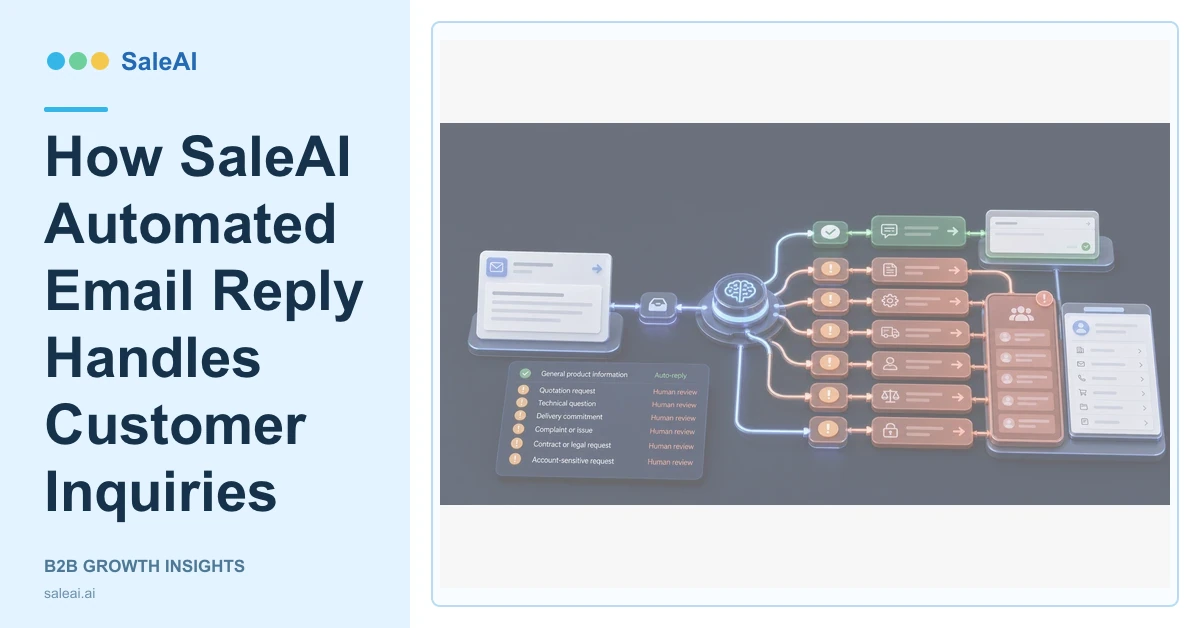
The Email Smart Reach product page includes an automated reply capability for customer inquiries. SaleAI automated email reply is most useful for timely, context-aware responses when the team has clear rules about which questions can be answered automatically and which require an accountable person.
Speed matters, but an immediate wrong answer creates more work than a measured response. Prices, delivery commitments, technical compatibility, complaints, legal language, and account-specific decisions should not be treated like routine requests for a catalog or meeting time.
Classify the inquiry before drafting
| Inquiry type | Automation can support | Review requirement |
|---|---|---|
| General product question | Approved summary and relevant link | Check relevance |
| Request for specification | Approved document and clarification | Technical review if ambiguous |
| Price or quotation | Gather quantity and requirements | Sales approval required |
| Delivery commitment | Collect location and timing | Operations approval required |
| Complaint or defect | Acknowledge and route | Human ownership required |
| Account or contract issue | Retrieve permitted context | Authorized owner required |
This classification prevents SaleAI automated email reply from treating every message as a content-generation task.
Use the customer record as context
SaleAI CRM organizes customer information, interaction history, notes, preferences, and stage. That context helps the reply continue the actual conversation. The system can avoid asking for information already provided and can identify the responsible owner.
The context also needs access boundaries. A response should use only account information appropriate for the recipient and task. Internal notes, unrelated contacts, or sensitive commercial information should not enter an external draft.
When company identity is unclear, Enterprise Scope may support background research. Data Assets may preserve source information. A SaleAI Agent can support approved website and synchronization tasks. These tools should resolve a specific missing fact rather than delay a simple answer.
Build a response that moves the inquiry forward
A useful automated draft does four things:
- Acknowledges the customer's actual question.
- Answers with approved information where possible.
- States what is still needed or who will confirm it.
- Provides one clear next step.
For example, a buyer requesting a quote without quantity, delivery destination, or specification should receive a concise clarification request. The system should not invent a price or present an unrelated product list.
Apply approval and escalation rules
Teams can define low-risk response classes that are eligible for faster handling. A draft may still be reviewed before sending, or the system may send only within an approved knowledge boundary. Higher-risk classes should route to sales, technical, operations, finance, or customer service.
The sent message and result should return to CRM. If the customer clarifies the requirement, the opportunity stage and next action may change. If the issue becomes a complaint, ownership should move to the appropriate workflow.
The NIST AI Risk Management Framework offers a useful model for mapping and managing AI-related risk. The U.S. CAN-SPAM requirements remain relevant when a response is part of promotional communication.
Measure reply quality
Review response time, factual corrections, escalations, customer clarification, resolution, and whether the next owner had enough context. A faster reply is not a success when it creates confusion or an unsupported commitment.
FAQ
What is SaleAI automated email reply designed to do?
It prepares timely, context-aware responses to customer inquiries and can route the conversation toward the next action.
Which replies should require human approval?
Prices, delivery commitments, technical claims, complaints, legal terms, sensitive data, and account-specific decisions should have accountable review.
Can CRM history improve the response?
Yes. Previous interactions, customer stage, preferences, and account ownership can make the reply more relevant.
Should an automatic reply answer an unclear quotation request?
It should request the missing quantity, specification, destination, timing, or application instead of inventing commercial terms.
What should be stored after sending?
Store the message, customer reply, classification, owner, escalation, and next task so future SaleAI automated email reply decisions retain context.
