



Most contact lists contain a hidden assumption: the person with a procurement title must be the right person to contact. That assumption can survive a spreadsheet import, a domain match, and a polished email until somebody asks a simple question: How do we know this person still works there, handles this category, or wants to receive this message?
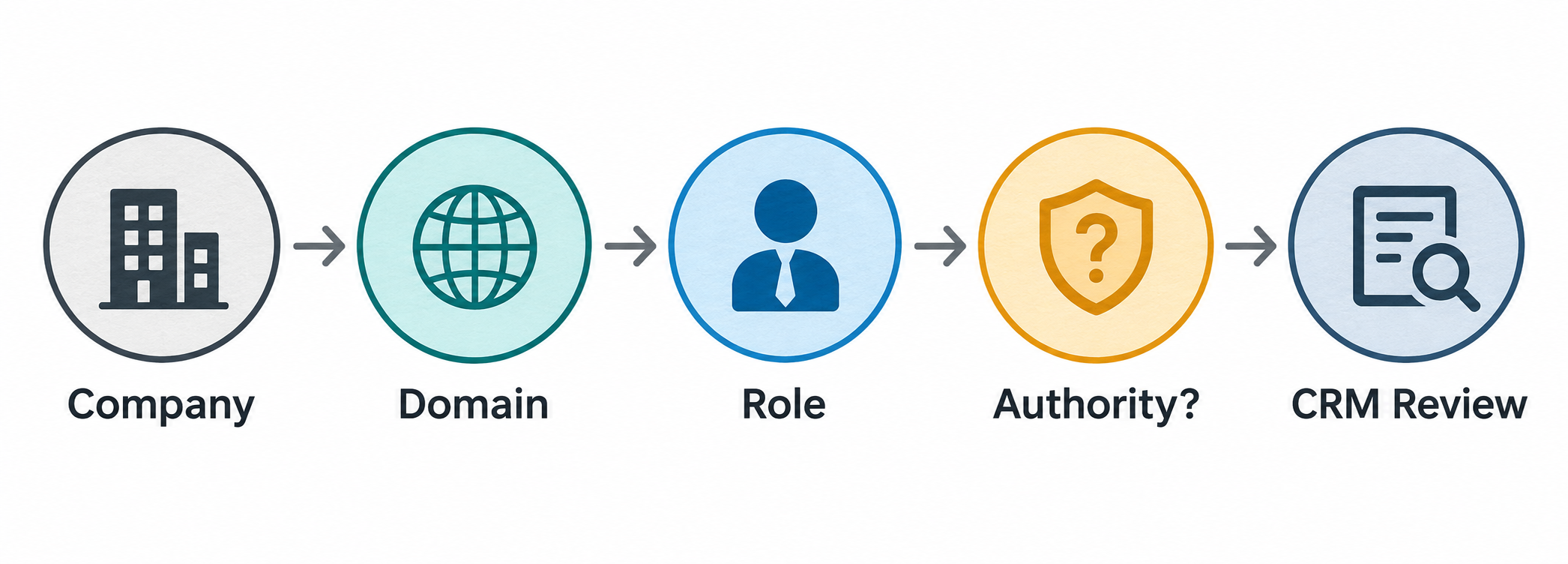
Procurement contact verification is the process of checking those facts before a person moves from research into a sales workflow. In SaleAI, the useful path is not a single “verified buyer” button. It is a sequence across company, domain, employee, role, source, and CRM evidence. The result should be a documented level of confidence and a next action, not a stronger label than the evidence supports.
The product facts in this guide come from an authenticated SaleAI workspace review dated October 17, 2026. The review confirmed visible search modes and CRM fields; it did not establish universal coverage, automatic buying-authority verification, or permission to contact a person.
1. Define what “verified” means for this account
Before opening a search mode, write the decision that the team needs to make. “Find a procurement contact” is too broad. A useful question identifies the account, the product context, and the decision that follows.
Examples:
- Is this person currently connected to the official domain of the distributor we found in a customs review?
- Does the person’s current role plausibly touch industrial pumps, or is the title too general to support a first message?
- Should this record remain in research, move to CRM for review, or be held until the company identity is resolved?
Use the following boundary when writing the brief:
| Fact to verify | Evidence that may support it | What the evidence does not prove |
|---|---|---|
| The company is the intended account | Official domain, company page, matching name and location | That the company buys your product now |
| The person is connected to the company | Employee or People result, current-looking profile, company domain | That the profile is current or controlled by the person |
| The role is relevant | Procurement, sourcing, category, product, or commercial responsibility described in context | That the person has final purchase authority |
| The contact route is usable | Public business route or reviewed CRM contact field | That the person has consented to every type of outreach |
| The record is ready for a next step | Identity, role, source date, owner, and unresolved questions documented | That SaleAI has automatically qualified the lead |
This definition keeps a useful distinction visible: identity evidence, role evidence, and activation evidence are related but not interchangeable.
2. Start with the company, not the job title
A role search can return a person who appears relevant but belongs to a similarly named business, an old employer, a consultancy, or a regional branch outside the target market. The first pass should therefore establish the account that the person is supposed to represent.
Record the company’s:
- Legal or public trading name as it appeared in the source.
- Official website or domain candidate.
- Product category, market, and location relevant to the research question.
- Original source and date, such as a customs result, company search, or public business page.
- Name variants that should not be merged without checking.
SaleAI’s Companies search can start from a company, brand, website, or industry keyword. Domain Data starts from a website domain and opens company, employee, contact, and deeper business context. These paths are useful because they make the company the anchor before a person is selected.
Do not silently normalize a name that looks close. “Northstar Components,” “North Star Component Trading,” and “Northstar Logistics” may be related, or they may be three separate organizations. Keep the returned spelling, then record the reason for any later merge.
For a deeper account check, compare the domain’s product language, location, contact route, and company description with the source that produced the account. A domain match is a strong identity clue; it is not proof of current procurement activity.
3. Choose the right Linkedin Data mode
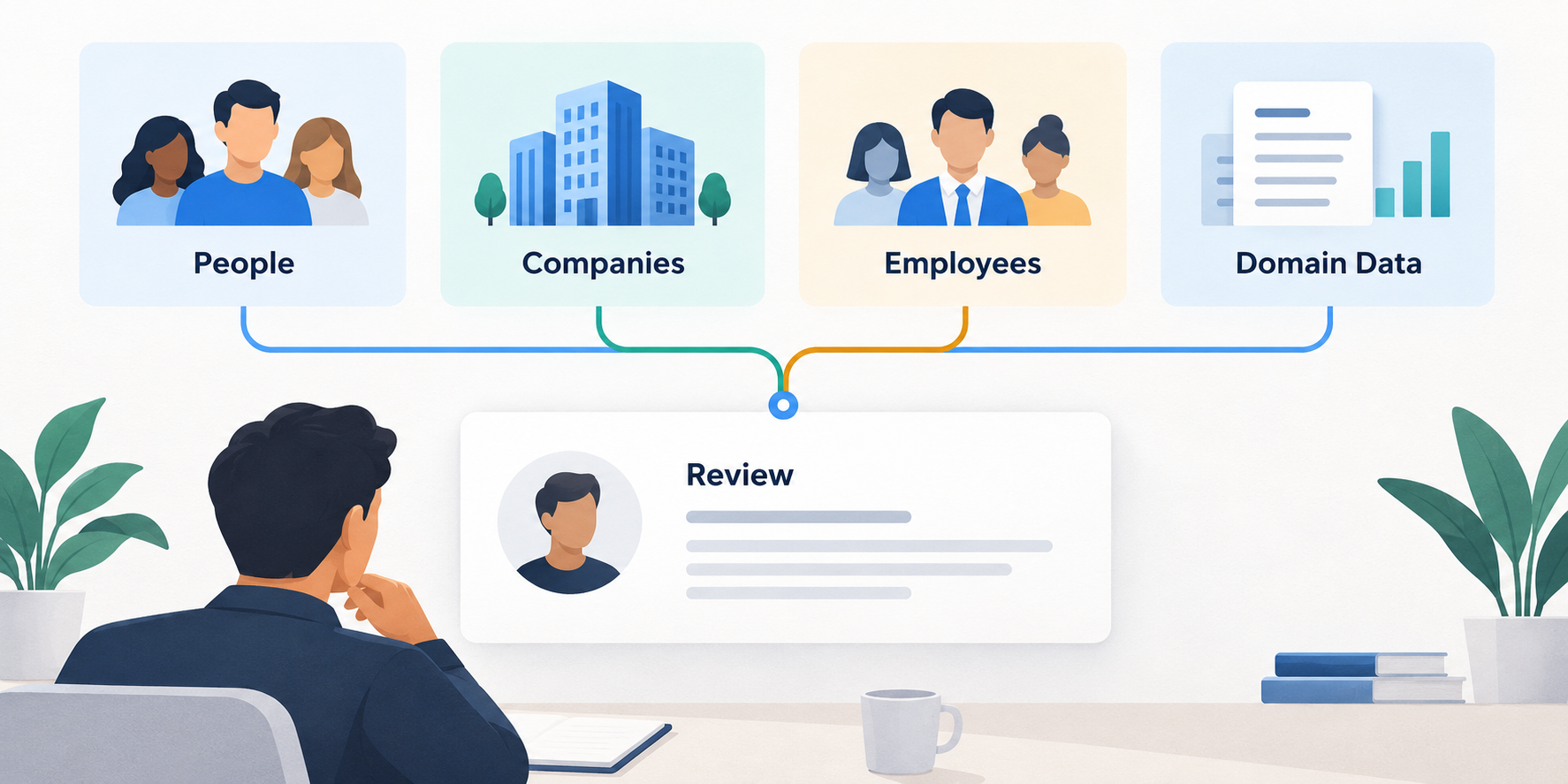
The authenticated workspace exposed four visible Linkedin Data routes: People, Companies, Employees, and Domain Data. They answer different questions.
| Linkedin Data mode | Use it when you need to know | Useful input | Main caution |
|---|---|---|---|
| Companies | Whether an organization or brand matches the account | Company, brand, website, or industry keyword | A company result does not identify the current decision-maker |
| Domain Data | What people and business context connect to a website | Official or candidate domain | A domain can be shared, redirected, outdated, or used by a branch |
| Employees | Which people appear connected to one company | Company plus a role or category filter | A job title is a role hypothesis, not authority proof |
| People | Whether a named or role-based person appears in the wider data | Name, title, company, or keyword | Broad searches increase false matches and stale profiles |
The safest sequence is usually Companies or Domain Data -> Employees -> People. Starting with People is reasonable when the person’s name comes from a trusted source, but the company and domain still need to be checked before CRM handoff.
The product review confirmed these visible inputs and modes. Some result areas showed a network error during the review, so this article does not claim that every search returns complete or current data for every market.
4. Match the person to the company and domain
After finding a possible employee, compare at least three identifiers:
- Company name and spelling.
- Domain or website associated with the account.
- Location, product category, branch, or other context from the original research.
Then look for a role description that makes sense for the company. A procurement manager at a manufacturer may have a different scope from a sourcing manager at a distributor. A “purchasing” title at a logistics company may describe internal supplies rather than resale products. The title is useful because it tells you what to investigate next; it is not the conclusion.
When the person’s profile and company page disagree, keep the record in a hold state. Do not replace the company name with the one that makes the title look more plausible. The unresolved mismatch is part of the evidence and may matter to the next reviewer.
An effective note might say:
The employee result shows a sourcing role connected to the candidate domain checked on 2026-10-26. The company page describes industrial pump distribution, but the profile does not specify responsibility for pumps. Role relevance remains a hypothesis; review before outreach.
That sentence is deliberately narrower than “verified procurement buyer.” It gives the next person a fact, a date, and a remaining question.
5. Separate title, influence, authority, and contactability
The word “buyer” collapses several different questions. A contact may influence supplier selection without signing a purchase order. A category manager may know the requirements while a plant manager approves the budget. A procurement analyst may be the best first route for a specification question but not the person who chooses vendors.
Use four separate fields in the review note:
- Current relationship: Does the person appear connected to the target company now?
- Role relevance: Does the role touch the product, category, or channel in question?
- Decision influence: What evidence suggests the person participates in evaluation, sourcing, or supplier coordination?
- Contactability: Is there an appropriate, monitored business route and a reason for the first message?
Only the first two may be partially visible in a profile. Decision influence often needs company context, product language, public documents, or a later conversation. Contactability is a separate sales and governance decision. Never let a title substitute for all four.
6. Preserve the source trail
A contact record becomes difficult to review when it contains only a name, email, and a confident tag. Keep the evidence that explains why the person entered the workflow:
- Source module or URL.
- Search input and role filter.
- Company and domain checked.
- Date checked.
- Relevant text or field observed.
- Reviewer and unresolved question.
- Proposed next action and review date.
The source trail does not need to be a long transcript. A six-line note is often enough:
| Note line | Example |
|---|---|
| Account | Northstar Components; official domain checked |
| Contact | Jordan Lee; sourcing manager result |
| Evidence | Employee result and company page agree on employer name |
| Gap | No product-category responsibility stated |
| Decision | Hold for role review; do not activate outreach |
| Owner/date | Mei; review 2026-10-29 |
This is a proposed team procedure, not a native SaleAI record format. The point is to keep the reasoning available when a contact is reassigned or revisited.
7. Decide whether the contact belongs in CRM
CRM entry should be a controlled handoff, not a reward for finding a profile. SaleAI CRM Management visibly separates contact and company context and displays fields such as owner, company, customer stage, tags, and last contact time. Those fields help the team organize a reviewed record; they do not automatically make the underlying evidence accurate.
Use a small disposition model:
| Status | Minimum evidence | Next action |
|---|---|---|
| Research | A possible person or company, but identity or role is incomplete | Keep source and search inputs; no activation |
| Identity check | Company and domain need comparison | Review official site, company result, and name variants |
| Role review | Person is plausibly connected, but buying relevance is unclear | Check category, branch, and responsibility evidence |
| Ready for CRM review | Company, person, source date, owner, and next question are visible | Create or update the record with a conservative stage |
| Outreach review | A legitimate route and a specific reason for contact are documented | Review sender, recipient, message, and applicable rules |
| Hold | Conflicting company, stale role, or unclear route | Preserve the conflict; do not merge or activate |
Avoid tags such as verified-buyer unless the team has a written definition and evidence standard for that label. A more honest label might be role-review, company-matched, or source:linkedin, with the detailed note kept elsewhere.
8. A worked example: one distributor, two possible contacts
Imagine a fictional exporter researching Northstar Components after finding the company in a recent product-related trade record. The company website lists industrial pump distribution. Two people appear in an Employees search:
- Jordan Lee, Sourcing Manager.
- Casey Morgan, Operations Director.
The result is not “Jordan is the buyer.” Instead, compare the evidence:
| Contact | What supports the hypothesis | What remains unknown | Disposition |
|---|---|---|---|
| Jordan Lee | Employee result connects the name to the candidate domain; sourcing title fits supplier research | Product category, current employment, and authority | Role review |
| Casey Morgan | Company connection and operational responsibility appear plausible | Whether purchasing decisions sit with operations | Identity and role review |
The next step is not to email both people with the same pitch. Check the company and domain first, record the role evidence, and decide which question a first conversation should answer. If the route is unclear, ask for the appropriate product or sourcing contact without claiming that either person has already been verified as the buyer.
This example is invented for the workflow. It is not a customer result or a SaleAI case study.
9. Use related SaleAI sources only to close a named gap
Procurement contact verification often needs more than one source, but opening every module creates noise. Match the next source to the unresolved question:
- Customs Data: Does the account appear in a relevant product or counterparty record?
- Companies or Domain Data: Is the organization and website identity coherent?
- Employees or People: Which role may be relevant, and is the person connected to the account?
- Google Data or Google Maps: Is the public location, category, or contact route current-looking?
- CRM Management: Who owns the review, what stage is appropriate, and what happened previously?
- Email Marketing: Is a reviewed sender, reply path, recipient list, and message ready for a controlled task?
The SaleAI buyer research guide explains how to choose a source by evidence gap. The SaleAI domain data company verification guide is useful when the company name and domain do not line up cleanly. These references do not turn a public profile into buying authority.
10. Know what the workflow does not establish
The review used for this article did not establish the following claims:
- That SaleAI automatically verifies a person’s procurement authority.
- That every profile or employee result is current, complete, or available in every market.
- That a title proves a person can approve a purchase.
- That a domain match proves the person controls the company’s buying process.
- That CRM creation proves consent, intent, or data accuracy.
- That a contact is ready for email simply because a business route exists.
The CRM data import checklist is a useful next step when several reviewed people are moving into a shared database. It emphasizes field mapping and record boundaries; use it alongside the evidence note rather than treating import as verification.
For data and automation decisions, retain a human reviewer. The NIST AI Risk Management Framework is a general reference for documenting context, risks, and accountability; it is not a certification of SaleAI or a legal opinion about outreach.
11. Run a small verification pilot
Test the workflow on one account type before scaling it:
| Day | Work | Evidence to retain |
|---|---|---|
| 1 | Choose one product, market, and company type | One-sentence verification question |
| 2 | Check company and domain identity | Source, URL, spelling, date |
| 3 | Search Employees or People | Search input, role filter, result reference |
| 4 | Compare role and account context | Supporting text and unresolved gap |
| 5 | Classify records as research, hold, or review | Disposition reason |
| 6 | Put only reviewed records in CRM | Owner, stage, tags, last-contact context |
| 7 | Audit a sample with another reviewer | Agreement, disagreement, time spent |
| 8 | Prepare a controlled outreach review if justified | Sender, reply route, recipient reason |
| 9 | Record the result without calling it intent | Reply, meeting, opt-out, or unknown |
| 10 | Decide whether to repeat or change the rule | Owner and next review date |
Measure the quality of the handoff, not only the number of profiles found. A useful pilot can answer whether another reviewer can reproduce the company match, whether the role note is specific enough, and how often a title turns out to be irrelevant after account review.
FAQ
What is procurement contact verification?
It is a review of whether a possible contact belongs to the intended company, has a role relevant to the product or buying question, has a traceable source and date, and is appropriate for a human-reviewed next step. It is not a single title lookup.
Does a procurement manager title prove buying authority?
No. The title is a useful hypothesis. Check the company, domain, current relationship, product context, responsibility, and appropriate contact route before describing the person as a likely buyer.
Which SaleAI Linkedin Data mode should I use first?
Start with Companies or Domain Data when the account identity is uncertain. Use Employees for people connected to a known company, and People for a named or role-based search that still needs company validation.
How do I match a person to the right company domain?
Compare the company name, domain, location or branch, product context, and source date. Keep conflicting names visible instead of merging them because a job title looks plausible.
Can Domain Data verify a procurement contact?
Domain Data can add company, employee, contact, and business context around a website. It does not by itself prove current employment, buying authority, or permission to contact.
Should a possible buyer enter CRM immediately?
Not necessarily. Keep incomplete records in research or hold status. Create or update a CRM record after the company, person, source, owner, unresolved question, and next action are documented.
What evidence should remain with the contact?
Keep the source module or URL, search input, company and domain checked, date, observed role evidence, reviewer, unresolved gap, and next review date. A name and confident tag are not enough.
Is a public business email enough to start outreach?
No. A business route may support a contact path, but it does not answer the reason for contact, current role, recipient expectations, or applicable outreach requirements. Review sender, recipient, message, and ownership separately.
How should I handle two possible procurement contacts at one company?
Compare their company connection, role context, product relevance, and the question each person could answer. Keep both in role review until the evidence supports a narrower next step; do not send the same unqualified message to both by default.
What should a first pilot prove?
It should show that another reviewer can reproduce the company match, understand the role evidence, distinguish influence from authority, and see why each record entered CRM or stayed on hold. Profile volume alone is not a success metric.
Closing
Good procurement contact verification turns a plausible name into a reviewable business question. SaleAI can provide separate paths for company, domain, employee, and people research, then give the team CRM fields for ownership and follow-up context. The team still has to decide what the evidence means, what remains uncertain, and whether a contact should receive a message.
For a walkthrough, bring one anonymized company, one product category, and two possible contacts. Ask the demonstrator to trace the company-domain match, the role evidence, the CRM handoff, and the work that still requires a person. That conversation produces a more useful decision than a list of titles labelled “verified buyer.”
